For years, businesses have depended on Multi-Factor Authentication (MFA) and Self-Service Password Reset (SSPR) to secure user access and reduce helpdesk load. But now, Microsoft is requiring all businesses to migrate to the unified Authentication Methods Policy in Entra ID by September 30, 2025. The clock is ticking, and waiting until the last minute isn’t an option.
This shift isn’t just another routine IT update, it’s an opportunity to modernize your identity infrastructure, elevate security, and improve the user experience.
So, let’s break down what’s changing, why it matters, and how forward-looking IT leaders are using this transition to get ahead.
Why This Migration Is Noteworthy
The combined registration experience for MFA and SSPR has been around since 2022, but until now, Microsoft allowed legacy policies to hang on. That ends on September 30, 2025, when Microsoft will enforce the shift to centralized management via the Authentication Methods Policy.
Here’s what’s driving the urgency:
What is the Authentication Policy?
The Authentication methods policy in Microsoft Entra ID is the recommended way to manage how users authenticate, especially with modern, passwordless methods. This policy allows Authentication Policy Administrators to enable or configure specific authentication methods for all users or targeted groups. Methods enabled through this policy can typically be used across Microsoft Entra for both sign-in and password reset scenarios. However, some methods have usage limitations, for example:
Each method can include specific configuration parameters for more precise control. For instance, when enabling Voice calls, you can specify whether to allow office phones in addition to mobile phones. For Microsoft Authenticator, you can enable advanced options like showing the app name or sign-in location to help users recognize legitimate requests and avoid MFA fatigue. Note that only users in the converged registration experience will see and register the correct methods aligned with this policy.
To manage it, go to Microsoft Entra admin center > Entra ID > Authentication methods > Policies.
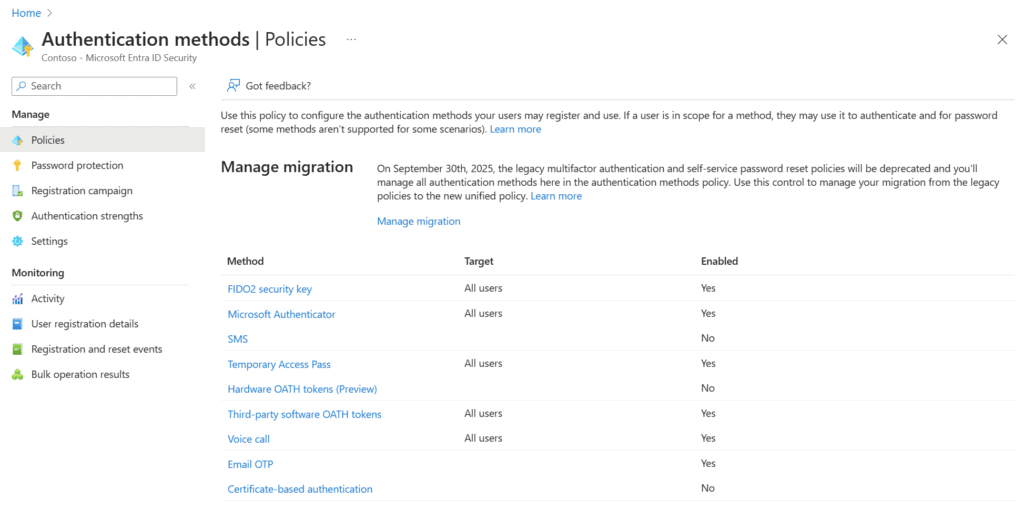
Image source: Microsoft Learn (Manage authentication methods – Microsoft Entra ID | Microsoft Learn)
What’s in Scope?
Migrating to the Authentication Methods Policy isn’t just a technical requirement, it’s a strategic opportunity to upgrade your entire identity framework. Here’s what you can unlock through this transition:
Combined Registration
One registration process for both MFA and SSPR. Fewer user prompts, fewer password reset tickets, and a consistent login experience.
New Authentication Methods
Pilot modern methods like:
Tiered MFA with Authentication Contexts
Different apps deserve different levels of security. Entra’s Authentication Contexts let you require stronger MFA (like FIDO2 or TAP) for high-risk apps like finance or HR, while allowing less intrusive methods for day-to-day tools.
Clear Communication Templates
You’ll need to message your users before registration begins. Templates, training resources, and visuals help reduce disruption and keep employees in the loop.
What Forward-Thinking IT Teams Are Doing Now

Smart IT leaders are treating this mandate as a catalyst, not a chore. Here’s what they’re doing to stay ahead:
- 1
Launching Internal Pilots
Test modern auth methods with small user groups, especially frontline teams, before wider rollout. - 2
Defining Security Tiers
Apply Authentication Contexts to tier MFA requirements based on app sensitivity and user roles. - 3
Enhancing Onboarding
Leverage Temporary Access Pass to onboard new users without passwords, simplifying IT workflows and reducing vulnerabilities. - 4
Running Authenticator Awareness Campaigns
Communicate early and often. A proactive communication strategy improves adoption and builds trust with end-users. We want users to be using the Authenticator app or other secure forms of MFA!
Identity Is the New Perimeter
As the workplace and threatscape evolve, the old castle-and-moat security model prevalent with VPN controls is obsolete. Compromised credentials remain the most common attack vector as they are responsible for 19% of breaches with an average cost of $4.5 million.
This migration is your chance to build a Zero Trust-ready identity foundation, one that balances strong security with a seamless experience. And with tools like QR sign-ins, passkeys, and context-aware policies, you’re not just complying with Microsoft’s timeline, you’re positioning your business for the future of authentication.
Take the Lead Before the Deadline
Modernizing now means avoiding last-minute scrambles and delivering a smoother, more secure experience for your users. Whether you’re a growing business or a global enterprise, the advantages are clear: easier management, enhanced security, and a future-ready identity platform.
The September 30, 2025 deadline is approaching fast. Businesses should use this moment to move confidently from outdated systems to modern identity leadership.