
Microsoft 365 has become much more than a collection of productivity applications. For many businesses, it now sits at the center of identity, endpoint management, cybersecurity, collaboration, data protection, and increasingly, artificial intelligence.
That makes choosing a Microsoft 365 managed service provider (MSP) a much bigger decision than finding someone to reset passwords or troubleshoot Outlook.
The right Microsoft 365 MSP should help you get more value from the technology you already own, strengthen your security posture, reduce unnecessary complexity, and build a roadmap for what’s next.
The wrong provider can simply add another layer of administration without addressing the underlying problems.
So, how do you choose a Microsoft 365 MSP?
Start by asking these nine questions.
1. How deep is your Microsoft 365 expertise?
This may seem obvious, but not every MSP that supports Microsoft 365 is truly a Microsoft 365 specialist.
There’s a big difference between providing help-desk support for Outlook and Teams and having deep expertise across the Microsoft cloud ecosystem.
A strong Microsoft 365 MSP should be able to work across areas such as:
The goal shouldn’t simply be to keep your Microsoft 365 environment running. Your MSP should understand how the different components work together.
This is particularly important as Microsoft continues to consolidate capabilities across its ecosystem. For example, changes to Microsoft 365 licensing and the growing integration of endpoint, identity, security, and AI capabilities mean that yesterday’s Microsoft 365 strategy can quickly become outdated.
Microsoft itself provides extensive usage reporting within the Microsoft 365 admin center, allowing businesses to identify underutilized products, users, and services.
What to ask:
“How much of your business is focused specifically on Microsoft technologies, and what Microsoft certifications and competencies does your team maintain?”
What to ask:
Your Content Goes Here
2. Can you manage security, not just Microsoft 365 administration?
Microsoft 365 security should be one of the most important considerations when evaluating an MSP.
Your Microsoft 365 tenant contains some of your organization’s most valuable assets: identities, email, documents, collaboration data, applications, and increasingly, AI-generated information.
Security therefore can’t be treated as an add-on.
A capable Microsoft 365 MSP should be able to help you implement and manage capabilities such as:
The stakes are significant. Microsoft’s 2025 Digital Defense Report found that more than 52% of cyberattacks with known motivations were driven by extortion and ransomware, while Microsoft reported processing more than 100 trillion security signals every day.
And the financial consequences of a serious security incident can be substantial. IBM’s 2026 Cost of a Data Breach research found that one in four malicious breaches were AI-enabled, with those breaches costing an average of $6 million.
An MSP should therefore be helping you continuously improve your security posture, not simply responding when something breaks.
What to ask:
Your Content Goes Here
3. Do you understand Microsoft Intune and modern endpoint management?
If an MSP says it specializes in Microsoft 365 but has limited experience with Microsoft Intune, that’s worth investigating.
Intune has become a foundational part of the modern Microsoft workplace. It connects endpoint management with identity, security, application management, compliance, and user experience.
Your MSP should understand how to manage the full endpoint lifecycle, including:
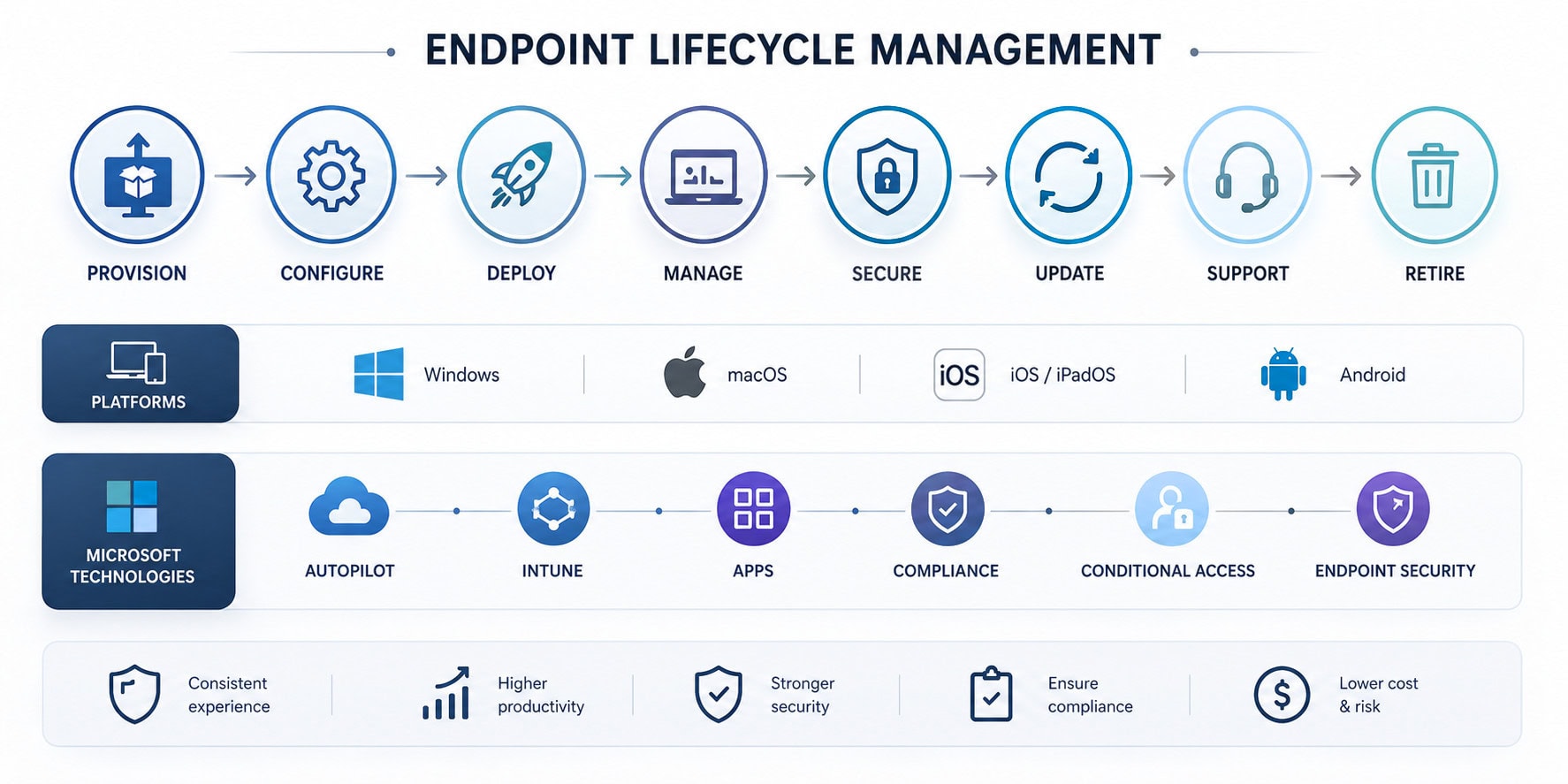
This matters particularly if you’re considering migrating away from legacy platforms such as SCCM, Workspace ONE, Jamf, or other endpoint management technologies.
For example, when Bristol City Schools moved from SCCM to Intune, Mobile Mentor helped the organization move away from manual imaging and on-site update requirements while introducing zero-touch provisioning and modern endpoint management.
Similarly, The Trust Company of Tennessee reduced device provisioning time by 90% after implementing modern endpoint management and zero-touch provisioning with Microsoft Intune and Windows Autopilot.
If endpoint management is part of your Microsoft 365 strategy, your MSP needs to understand more than just the Intune admin center. It needs to understand the architecture surrounding Intune.
For more on the current Intune landscape, see Mobile Mentor’s [Guide to Understanding Microsoft Intune Licensing in 2026]. Guide to Understanding Microsoft Intune Licensing in 2026
What to ask:
Your Content Goes Here
4. Will you help us optimize our Microsoft 365 licenses?
One of the easiest ways to waste money on Microsoft 365 is to treat licensing as something you purchase once and forget about.
Microsoft licensing is constantly evolving. Businesses may have users assigned licenses they don’t need, multiple tools performing overlapping functions, or Microsoft capabilities that they’re already paying for but aren’t using.
A good Microsoft 365 MSP should periodically review:
The question isn’t simply “Can you sell us Microsoft licenses?”
It’s:
“Can you help us make better decisions about the licenses we already have?”
That’s an important distinction.
A strong MSP should be willing to tell you when you’re over licensed, when a third-party product is unnecessary, or when moving to a different Microsoft license could unlock capabilities you’re already paying for elsewhere.
For a deeper look at the changing Microsoft licensing landscape, Microsoft 365 E3 vs. E5 vs. E7: Which Microsoft 365 License Is Right for Your Business?
What to ask:
Your Content Goes Here
5. Is your service proactive or reactive?
This is one of the most important questions to ask an MSP.
A traditional MSP may measure success by how quickly it closes support tickets.
A modern Microsoft 365 MSP should measure success by how often those problems don’t happen in the first place.
Ask whether your provider proactively monitors and improves:
Microsoft 365 is changing constantly. New features, security capabilities, licensing changes, AI functionality, and policy requirements are introduced throughout the year.
Your MSP needs to stay ahead of those changes.
What to ask:
Your Content Goes Here
6. Can you support our internal IT team, or are you trying to replace it?
Not every organization wants to outsource its entire IT department.
In many cases, the best Microsoft 365 MSP relationship is co-managed IT.
Your internal team may own strategy, architecture, business relationships, and projects while an MSP handles specialized Microsoft 365 administration, endpoint management, security operations, and day-to-day support.
This can be particularly valuable for businesses that have capable IT professionals but don’t have the capacity to become experts in every corner of the Microsoft ecosystem.
What to ask:
Your Content Goes Here
7. Can you help us prepare for AI and Microsoft Copilot?
A Microsoft 365 MSP should be thinking beyond today’s environment.
AI is changing what organizations expect from Microsoft 365. Microsoft Copilot and the broader Microsoft AI ecosystem introduce new opportunities, but also new questions around security, governance, licensing, data access, and user readiness.
According to the 2026, Endpoint Ecosystem study, only 29% of employees say AI delivers regular or essential value in their work. This is gap and foreward-thinking employers are looking to fill.
The question isn’t simply whether an MSP can turn on Copilot.
It should be able to help you answer:
AI security is already becoming a serious consideration. IBM’s 2025 research found that 97% of organizations that experienced an AI-related breach reported lacking proper AI access controls.
That means AI readiness and security readiness increasingly belong in the same conversation.
A Microsoft 365 MSP should be helping you prepare for that future now.
Mobile Mentor’s recent work with TD SYNNEX provides a good example of this type of engagement. Rather than simply implementing technology, the business worked with Mobile Mentor to evaluate Intune, Endpoint Privilege Management, Advanced Analytics, Microsoft Defender, Security Copilot, and the broader Microsoft security ecosystem.
What to ask:
Your Content Goes Here
8. Can you prove that your approach works?
Every MSP can tell you that it has experienced engineers.
Every MSP can tell you that it provides excellent service.
The better question is:
Can you show me what you’ve actually done?
Ask for case studies that demonstrate experience with organizations similar to yours.
Look for evidence of:
Don’t just ask for logos.
Ask what changed.
For example, Mobile Mentor has helped organizations move from legacy endpoint platforms to Intune, including migrations from SCCM, Jamf, Workspace ONE, and MobileIron.
The best case studies don’t just demonstrate technical capability. They demonstrate business outcomes.
What to ask:
Your Content Goes Here
9. What happens after implementation?
This may be the most overlooked question in the entire MSP selection process.
Many providers have excellent implementation teams.
But what happens six months later?
Microsoft 365 isn’t a static environment. Your organization changes. Employees join and leave. Microsoft releases new capabilities. Security threats evolve. Licenses change. Devices age. Business requirements shift.
Your MSP should have a plan for continuous improvement.
Ask what happens after implementation:
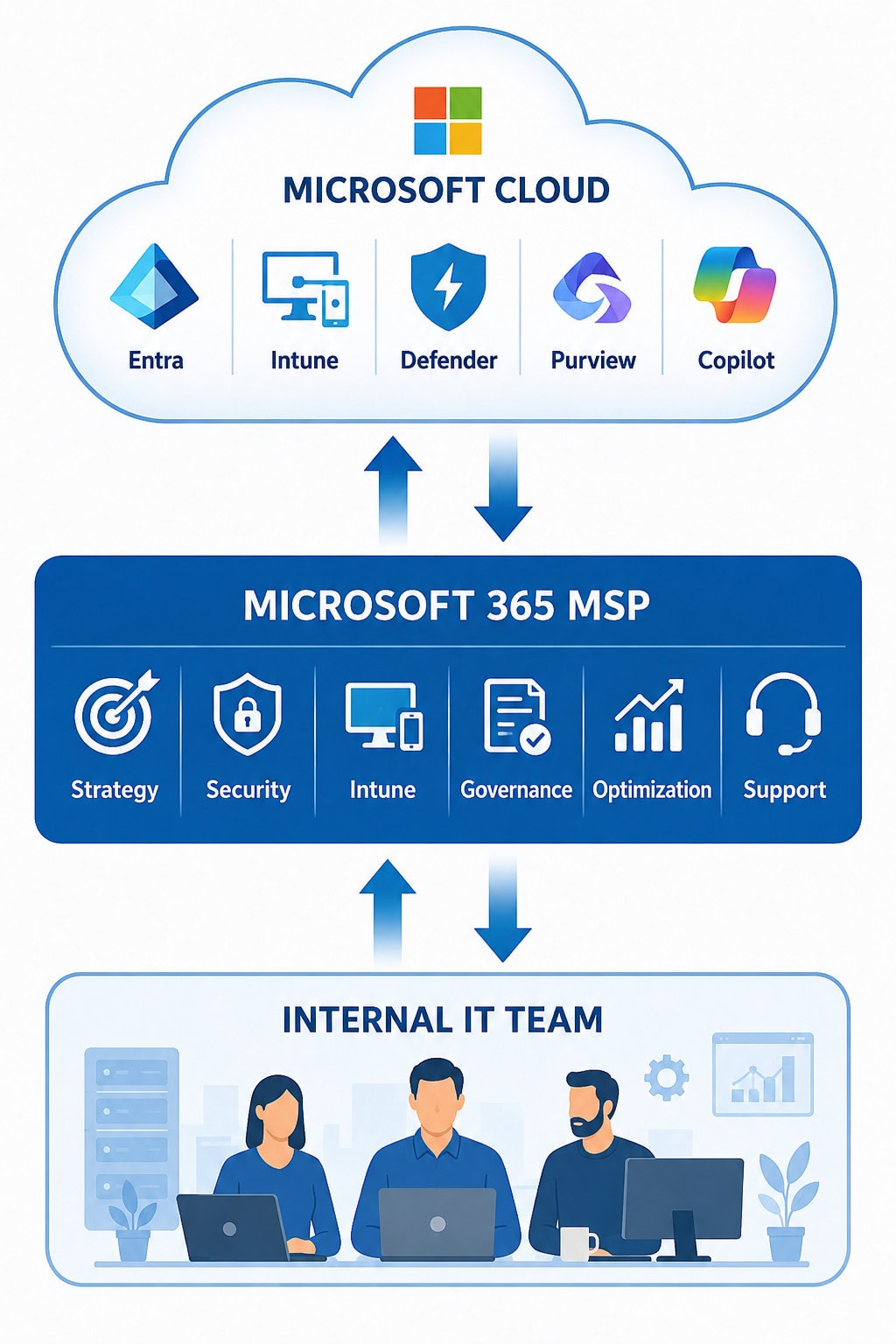
A mature Microsoft 365 managed service should include governance and ongoing optimization, not simply a support queue.
Microsoft’s own Adoption Score tools demonstrate the importance of measuring how employees actually use Microsoft 365 rather than assuming that deployed technology automatically creates value.
The best MSP relationships therefore evolve from implementation → management → optimization → transformation.
What to ask:
Your Content Goes Here
The Right Microsoft 365 MSP Should Be More Than a Help Desk
Choosing a Microsoft 365 MSP isn’t really about finding someone to manage Microsoft 365.
It’s about finding a partner that can help you get more value from Microsoft 365 while reducing complexity and risk.
The strongest providers should be able to connect the dots between:
Identity → Devices → Security → Applications → Data → AI
They should understand your current environment, identify where you’re exposed or wasting money, and create a roadmap for where you need to go next.
And they shouldn’t be afraid to tell you when you’re already paying for something you don’t need, or when you aren’t getting enough value from something you already own.
A Microsoft 365 MSP Evaluation Checklist
Before selecting a provider, make sure you can answer “yes” to these questions:
If the answer is yes across the board, you’re probably looking at more than a traditional MSP.
You’re looking at a Microsoft 365 strategic partner.
LEARN MORE ABOUT MICROSOFT 365 MANAGED SERVICES

Andrew Reade
Andrew is our Digital Marketing Manager and oversees web-based marketing strategies and content creation for the organization. As a marketing veteran, Andrew has worked with organizations of all sizes in a diverse group of industries, from Risk Management to Transportation. Joining the organization in 2021, Andrew is based in Mobile Mentor’s Nashville, TN office.