
For years, workflow automation has been limited by one major constraint: technical complexity.
Most automation tools require scripting knowledge, specialized development resources, or time-intensive configuration. That creates a bottleneck where only technical teams can build automations, while everyone else continues handling repetitive operational work manually.
Microsoft Copilot Cowork has the potential to change this dynamic entirely.
Positioned as an AI collaborator embedded within the Microsoft ecosystem, Copilot Cowork introduces a more conversational approach to workflow automation—one where users describe tasks in everyday language and the AI agent translates those instructions into repeatable workflows (“skills”).
That shift could significantly reshape how businesses think about productivity, operations, and AI adoption.
What Is Microsoft Copilot Cowork?
Copilot Cowork is designed to function less like a chatbot and more like a collaborative AI agent capable of learning workflows and executing recurring tasks.
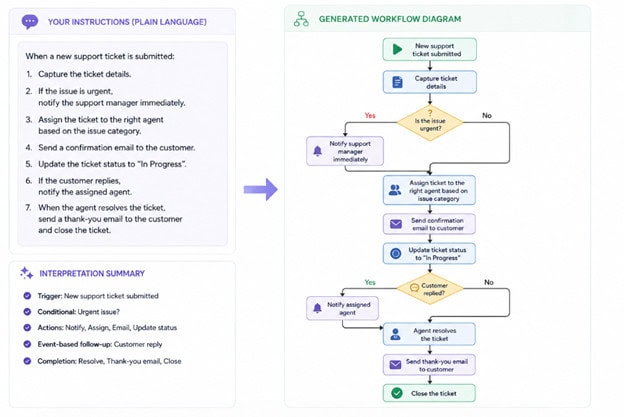
Instead of asking users to build automations through scripts or low-code platforms, Cowork allows employees to explain what they want accomplished conversationally.
For example:
The AI agent then formalizes those instructions into structured workflows.
That accessibility is what makes Copilot Cowork especially compelling. It lowers the barrier to automation for non-technical users while keeping automation inside the Microsoft ecosystem organizations already trust.
Why Copilot Cowork Matters for Enterprise Teams
Unlike standalone AI subscriptions designed for consumers, Copilot Cowork operates within Microsoft Copilot and connects into your Microsoft Graph and enterprise security controls.
This distinction matters.
Enterprise organizations are increasingly interested in AI automation, but many are hesitant to adopt disconnected AI tools that introduce governance, compliance, or security concerns.
Because Cowork exists inside your Microsoft environment, organizations can automate workflows while maintaining visibility, identity controls, and enterprise-grade security standards.
For many businesses, that may be the difference between experimenting with AI and operationalizing it at scale.
Copilot Cowork and Rule-Based Consistency
One of the most underrated aspects of AI workflow automation is consistency.
Many business processes are not difficult because they are intellectually complex, they are difficult because they are repetitive, detail-oriented, and rules-driven.
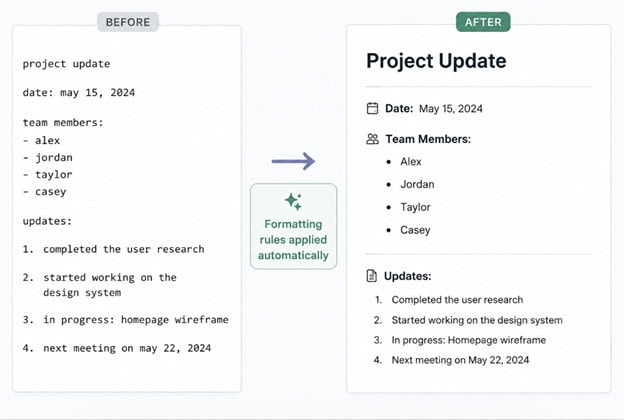
Copilot Cowork standardizes outputs by following predefined requirements such as:
That level of consistency can reduce review cycles, minimize revisions, and create more reliable operational workflows.
For organizations producing large volumes of customer-facing documentation or recurring reports, those time savings can compound quickly.
Conversational Automation Changes Who Can Build Workflows
Traditional automation platforms often remain centralized within IT or operations teams because they require technical expertise.
Copilot Cowork changes that model by enabling conversational automation.
Instead of manually scripting workflows, users simply describe the process they want automated:
That opens automation capabilities to a much broader group of employees.
Cross-functional teams may soon be able to automate portions of their own workflows without waiting for dedicated development resources or technical support. No more IT bottleneck.
The Best Time to Experiment Is Now
Organizations do not need to wait for a perfect enterprise-wide use case to begin exploring Copilot Cowork.
The most effective starting point is often a recurring, rule-based task such as:
Small experiments help organizations identify:
More importantly, early experimentation prepares teams for a future where conversational automation becomes a standard part of enterprise operations.
Copilot Cowork Represents a Bigger Shift
The real opportunity with Copilot Cowork is not just productivity, it’s operational transformation.
For decades, automation required technical expertise. Conversational AI changes that equation by making workflow automation accessible through natural language.
That means organizations may soon stop asking:
“Can we automate this?”
And start asking:
“How do we describe this process clearly enough for Copilot Cowork to handle it?”
That’s a fundamentally different way of thinking about work, process design, and operational scale.
As Copilot Cowork evolves with deeper integrations and broader automation capabilities, it will become one of the most important developments in the future of enterprise AI productivity.
In many cases, Microsoft Defender for Endpoint doesn’t just replace Bitdefender—it expands what’s possible.