
Microsoft Intune has evolved well beyond device enrollment, configuration policies, and compliance reporting.
For businesses already using Intune, one of the biggest opportunities is turning the endpoint data already being collected into actionable intelligence.
That is where Microsoft Intune Advanced Analytics comes in.
Advanced Analytics builds on Endpoint Analytics to give IT teams deeper visibility into endpoint performance, battery health, anomalies, device events, and device configuration. It also adds capabilities such as near real-time Device Query and fleet-wide Device Query using Kusto Query Language (KQL).
The goal is straightforward: help IT teams move from reacting to endpoint problems after users report them to identifying patterns, investigating issues faster, and making better decisions before those problems become widespread.
For businesses with large or distributed endpoint environments, that shift can have a meaningful impact on the service desk, device lifecycle, employee experience, and IT operations.
What is Microsoft Intune Advanced Analytics?
Microsoft Intune Advanced Analytics is an extension of Endpoint Analytics that provides deeper insight into the health and performance of managed endpoints.
Microsoft currently includes several major capabilities in Advanced Analytics:
Advanced Analytics is integrated into the Microsoft Intune admin center rather than requiring a separate analytics platform. Microsoft says the capabilities are designed to turn endpoint telemetry into actionable insights around device performance, troubleshooting, user experience, and operational decisions.
That distinction matters.
The value isn’t simply having more endpoint data. The value comes from being able to use that data to make better decisions and change how IT operates.
From endpoint reporting to endpoint intelligence
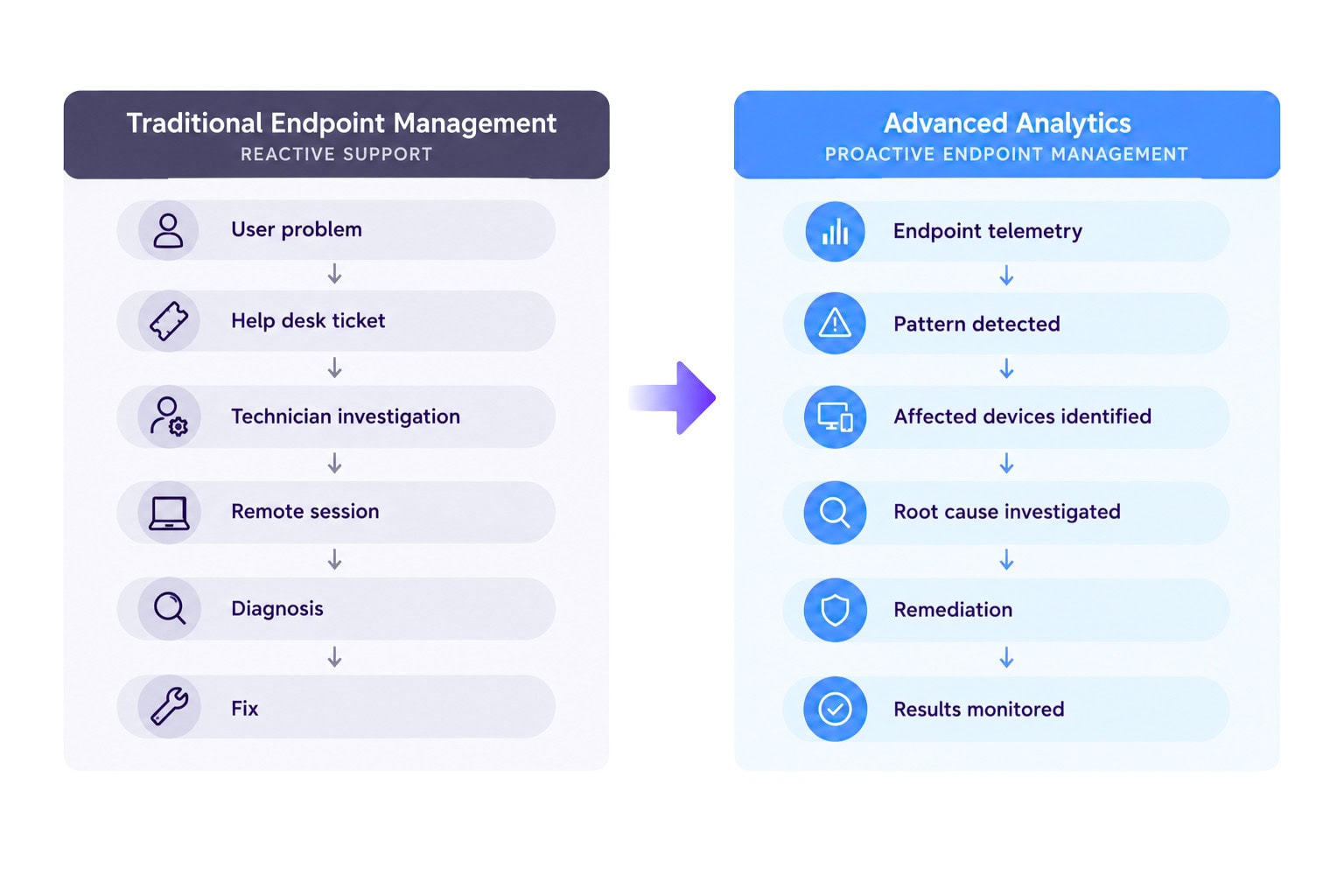
Traditional endpoint management often works like this:
User experiences problem → user contacts help desk → technician investigates → technician connects to device → issue is diagnosed → fix is deployed
That model is still necessary in some situations, but Advanced Analytics can shorten or sometimes eliminate several of those steps.
A more proactive model looks like this:
Endpoint telemetry → pattern identified → affected devices identified → root cause investigated → remediation deployed → results monitored
That changes the role of endpoint management.
Instead of simply asking:
“Is this device compliant?”
IT can start asking:
“Why are these devices performing poorly?”
“Did a recent application update cause this problem?”
“Which device models are experiencing the most issues?”
“Which batteries are approaching failure?”
“Are users experiencing problems before they’re opening tickets?”
“How many devices are affected by this configuration change?”
Those are much more useful questions.
What can IT teams actually do with Advanced Analytics?
1. Find devices with performance problems
The Resource Performance report helps IT teams identify CPU and RAM performance issues across devices, models, and manufacturers.
This can be useful when an organization is trying to determine whether a performance problem is isolated to individual devices or indicative of a larger hardware issue.
For example, imagine a businesses has 5,000 Windows laptops.
Users are reporting that their devices feel slow, but there isn’t an obvious software problem.
Instead of replacing devices based on anecdotal reports, IT can analyze performance by:
That can reveal patterns that aren’t obvious from individual support tickets.
A practical example
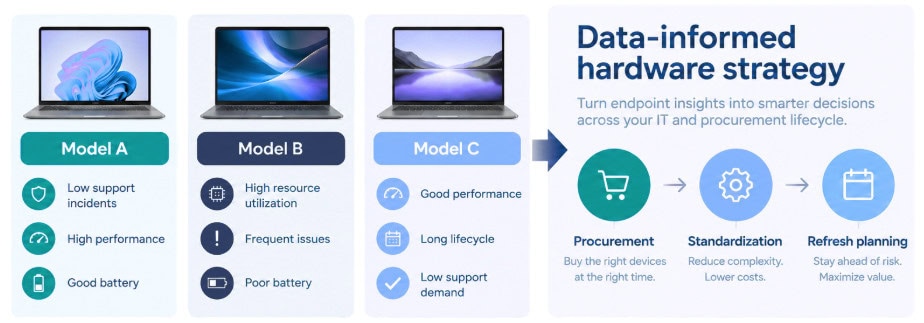
Suppose three different laptop models are deployed across the organization.
Model A performs normally.
Model B shows elevated resource utilization across a particular group of users.
Model C consistently performs well despite being older.
That information can influence the next hardware refresh cycle.
Rather than automatically replacing every device after a predetermined number of years, IT can use endpoint data to help determine where replacement spending is most justified.
That’s a much more strategic use of endpoint analytics.
2. Identify battery problems before users start complaining
Battery health is another area where Advanced Analytics can move IT from reactive support to proactive device management.
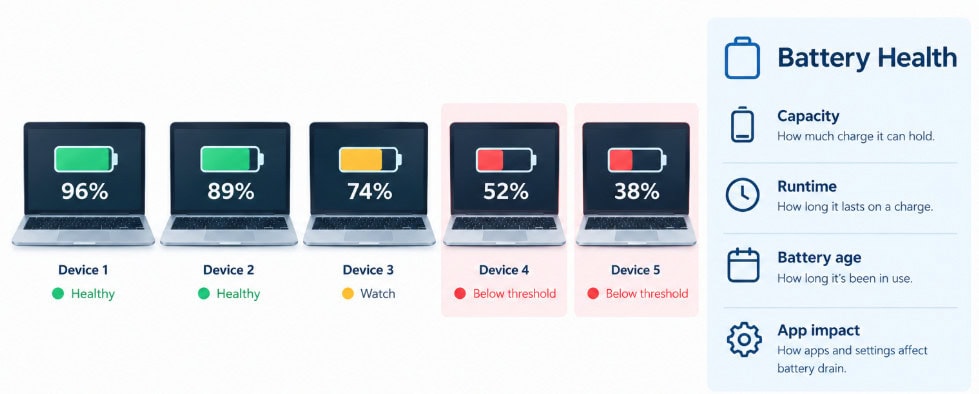
The Battery Health report provides visibility into battery condition and its potential impact on user experience. IT teams can identify devices with poor battery health, monitor battery capacity, and identify batteries that may need replacement.
This creates an opportunity to incorporate battery data into the endpoint lifecycle.
Instead of waiting for:
“My laptop won’t hold a charge.”
IT can identify devices with deteriorating batteries and address them proactively.
The report can also provide insight into whether poor runtime is actually caused by the battery.
Microsoft notes that low runtime can also result from applications consuming significant power. The Battery Health report includes app-impact information that can help IT investigate those situations.
That creates another useful question:
Is the battery failing, or is the user’s workload consuming the battery unusually quickly?
Those require very different solutions.
3. Detect endpoint problems before they become widespread
One of the most interesting capabilities in Advanced Analytics is the Anomalies report.
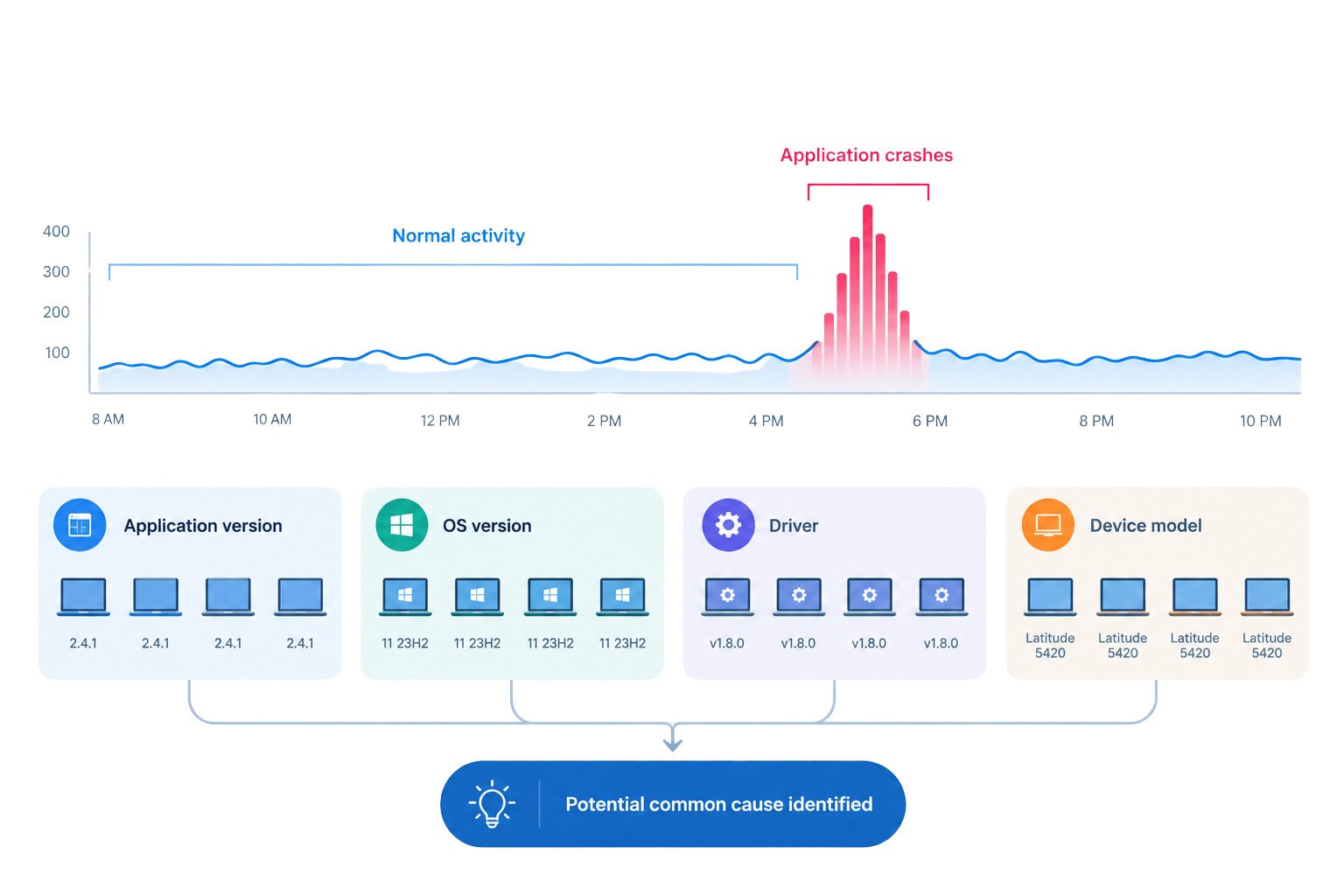
Anomalies helps identify device health problems involving things such as application hangs, application crashes, and Stop Error Restarts.
More importantly, Microsoft says the feature can correlate affected devices based on shared characteristics such as:
Why anomaly detection matters
Consider a company that deploys a new application version to thousands of employees.
Within hours, a subset of devices begins experiencing application crashes.
Without centralized analytics, the IT team might learn about the problem through individual support tickets.
With Advanced Analytics, IT can look for patterns across affected devices.
If most of the affected machines share the same application version, device model, driver, or OS version, that gives the support team a much better starting point for investigation.
Instead of treating 100 support tickets as 100 separate problems, IT may discover that they are all symptoms of one underlying problem.
That’s a significant operational difference.
4. Investigate exactly what happened on a device
Advanced Analytics also adds the Device Timeline, which provides a history of events occurring on an individual device.
The timeline can include events such as:
IT administrators can filter the timeline by event, source, level, and time period. Microsoft says the timeline can help administrators correlate events such as software updates, user activity, and system events during troubleshooting.
This can dramatically improve the context available to a support technician.
Imagine this support ticket:
“My laptop started crashing after the update yesterday.”
Instead of immediately connecting to the device and manually digging through different logs, the technician can examine the Device Timeline around the reported time.
They may see:
10:02 AM: Windows update
10:17 AM: Application update
10:21 AM: Application crash
10:24 AM: Device restart
10:31 AM: Application becomes unresponsive again
That timeline doesn’t automatically diagnose the problem.
But it gives the technician something much more valuable:
context.
And context can significantly reduce troubleshooting time.
5. Query a device in near real time
Device Query is one of the capabilities that most clearly changes how endpoint troubleshooting can work.
Microsoft describes Device Query as a way to retrieve on-demand information about the state and configuration of Windows devices. Queries can be run in real time against supported devices using Kusto Query Language.
Instead of asking a user to navigate through Windows settings or asking a technician to remotely connect to the machine, IT can query specific information directly.
For example, a technician could investigate things such as:
Microsoft specifically recommends considering Device Query for support tasks that would normally require a remote-control session.
That creates a powerful opportunity for help desks.
Device Query and the service desk
Consider a Level 1 support technician receiving a ticket:
“I can’t launch the application.”
Instead of immediately escalating the ticket or initiating a remote support session, the technician may be able to query the device for:
If the problem can be identified remotely, the technician may be able to resolve it without interrupting the employee’s workflow.
Microsoft also supports remote actions from the Device Query experience, depending on the device and configuration.
That can help turn endpoint analytics from a reporting tool into part of an actual troubleshooting workflow.
6. Query your entire device fleet
Single-device queries are useful.
Fleet-wide queries are where things become much more interesting for endpoint teams.
Device Query for multiple devices allows IT teams to run KQL queries across device inventory data and identify trends across their managed fleet. Microsoft currently supports queries across Windows, Android Enterprise corporate-owned devices, iOS/iPadOS, and macOS, subject to platform and configuration requirements.
This opens up a different category of questions.
Instead of:
“What’s happening on this laptop?”
IT can ask:
“How many devices have this configuration?”
“Which devices have TPM disabled?”
“How many devices are running each OS version?”
“Which devices have the lowest battery capacity?”
“How many devices have a particular hardware configuration?”
Microsoft provides examples including queries for battery capacity, memory, OS versions, BIOS information, and TPM status.
For larger organizations, this can become a valuable operational tool.
7. Turn KQL into an endpoint management tool
Device Query uses Kusto Query Language (KQL).
If your IT team already uses Microsoft Defender, Microsoft Sentinel, or other Microsoft data platforms that rely on KQL, there is an additional advantage: administrators can apply familiar query concepts to endpoint data.
For businesses without KQL expertise, that shouldn’t necessarily be a barrier.
Microsoft now supports Copilot in Intune to help generate KQL queries for Device Query using natural-language requests.
That means an administrator can move toward a workflow such as:
“Show me Windows devices with less than 50% battery capacity.”
or:
“Find devices where TPM is disabled.”
and use the resulting query to investigate the fleet.
The bigger opportunity isn’t simply learning KQL.
It’s building a library of repeatable queries around common IT problems.
For example:
Service desk queries
Security queries
Lifecycle queries
Those queries can become reusable operational tools rather than one-off investigations.
8. Make better hardware purchasing decisions
Advanced Analytics can also connect endpoint management with procurement.
Resource Performance provides information about CPU and RAM performance across devices, models, and manufacturers. Battery Health provides additional information about device and battery performance.
That means endpoint data can contribute to hardware decisions.
For example:
Question: Which laptop model should we standardize on next year?
Instead of relying solely on:
IT can also look at actual performance data from the organization’s existing fleet.
That doesn’t mean analytics should make the purchasing decision.
It means procurement and IT have another source of evidence.
Over time, this can help businesses identify:
The result is a more data-driven approach to endpoint lifecycle management.
9. Segment analytics by the devices that matter
Large businesses don’t necessarily want to analyze every device together.
A healthcare organization may want to look at clinical devices separately from administrative laptops.
A global business may need to analyze devices by region.
A company with multiple business units may want to separate corporate IT from acquired organizations.
Advanced Analytics includes Device Scopes, which use scope tags to filter endpoint analytics reports to subsets of devices. This allows IT teams to view scores, insights, and recommendations for specific groups.
That makes analytics more useful at scale.
Instead of asking:
“How healthy is our endpoint environment?”
IT can ask:
“How healthy is the endpoint environment for this business unit?”
or:
“Are the devices in this region experiencing the same issues as the rest of the organization?”
That distinction becomes increasingly important as organizations grow more distributed.
10. Use analytics after major changes
One of the most practical uses of Advanced Analytics is monitoring what happens after a change.
IT teams constantly introduce changes:
The question is often:
“Did the change cause problems?”
Advanced Analytics can provide another layer of evidence.
The Anomalies report can identify regressions in device health and productivity, while Device Timeline can help administrators correlate issues with events such as updates and restarts.
That makes Advanced Analytics useful as part of a change-management process.
A practical workflow
Before the change
Establish a baseline.
Deploy the change
Roll it out to a controlled group.
Monitor
Look for anomalies and performance changes.
Investigate
Use Device Timeline and Device Query.
Remediate
Address the root cause.
Expand
Continue deployment when the data supports broader rollout.
Monitor again
Confirm that the issue doesn’t reappear at scale.
This is a much more controlled approach than deploying a change and waiting for the help desk to tell you whether it worked.
11. Advanced Analytics can help connect IT and security
Endpoint management and security are increasingly interconnected.
A device’s configuration, health, identity, applications, and security posture all contribute to the organization’s overall risk.
Microsoft’s current training materials describe Advanced Analytics as providing advanced device signals that can complement Microsoft Defender and support risk-based endpoint management and Conditional Access decisions.
This is where Advanced Analytics starts becoming more than a help desk tool.
For example, endpoint analytics can contribute to questions such as:
Intune doesn’t replace Defender, Entra ID, or Conditional Access.
The opportunity is to make those systems work together as part of a broader Microsoft security architecture.
12. Where Advanced Analytics fits into a modern Microsoft environment
For businesses heavily invested in Microsoft 365, Advanced Analytics becomes most useful when it is treated as part of a larger ecosystem.
A modern endpoint environment might look something like this:
Microsoft Intune
Device management, configuration, compliance and applications
↓
Advanced Analytics
Performance, health, anomalies and endpoint intelligence
↓
Microsoft Defender
Threat and security signals
↓
Microsoft Entra ID
Identity and access
↓
Conditional Access
Access decisions based on identity, device and risk
↓
Microsoft Purview
Data security, compliance and governance
The individual products matter.
But the real value comes from how the signals and controls work together.
That is one of the biggest advantages for organizations that have already invested in Microsoft’s security and endpoint ecosystem.
Advanced Analytics isn’t just another dashboard
It’s easy to look at Advanced Analytics as another reporting feature inside Intune.
That undersells what it can do.
The more important question is:
How does your IT team use the information?
If the reports are checked once a quarter and nothing changes, the organization isn’t getting much value from them.
The real opportunity comes from connecting analytics to operational processes.
For example:
Help desk
Use Device Query and Device Timeline to investigate issues faster.
Endpoint engineering
Use anomalies and performance data to identify systemic problems.
Procurement
Use resource and battery information to inform hardware decisions.
Security
Use endpoint signals alongside Defender, Entra ID and Conditional Access.
IT operations
Monitor the impact of configuration and application changes.
Lifecycle management
Identify devices that should be repaired, upgraded or replaced.
Leadership
Use endpoint data to understand technology performance and prioritize investments.
That’s when Advanced Analytics becomes operational intelligence rather than another dashboard.
Getting more from Microsoft Intune
Advanced Analytics is powerful, but technology alone doesn’t create better endpoint management.
The biggest gains come from knowing which data matters, establishing the right operational processes, building useful queries and reports, and connecting endpoint insights to broader security and IT strategy.
We help businesses modernize endpoint management, strengthen security and get more from their Microsoft investment.
If you’re already using Intune but aren’t sure how to turn endpoint data into actionable intelligence, drop us a line below about your current environment, priorities and roadmap.
Get in Touch With the Mobile Mentor Team to Learn More

Andrew Reade
Andrew is our Digital Marketing Manager and oversees web-based marketing strategies and content creation for the organization. As a marketing veteran, Andrew has worked with organizations of all sizes in a diverse group of industries, from Risk Management to Transportation. Joining the organization in 2021, Andrew is based in Mobile Mentor’s Nashville, TN office.