
For years, VMware Horizon filled a very specific role. It gave businesses a way to virtualize desktops, often hosted on-prem, with a level of control IT teams were comfortable with. It worked. It was familiar. And for many businesses, it became foundational.
But the ground has shifted. 
Horizon’s journey (from VMware to Broadcom, and now Omnissa) has prompted many IT leaders to pause and reassess. At the same time, Microsoft’s cloud-first desktop platforms, Entra ID and Windows 365 (W365), have matured quickly.
The result? A growing number of businesses are moving Horizon workloads to AVD or Windows 365. This isn’t just because of licensing changes, but because the cloud model now aligns better with how work actually happens.
Why Make the Move from Horizon?
This shift usually starts with cost or licensing uncertainty, but it rarely ends there.
-
On-prem infrastructure is becoming a tax on agility
Horizon environments are often tightly coupled to on-prem hardware, storage, and networking. That means refresh cycles, capacity planning, and downtime risk all sit squarely with IT. In contrast, AVD and Windows 365 remove the infrastructure burden entirely. Scaling up or down becomes a policy decision, not a procurement project.
-
The Microsoft ecosystem advantage is real
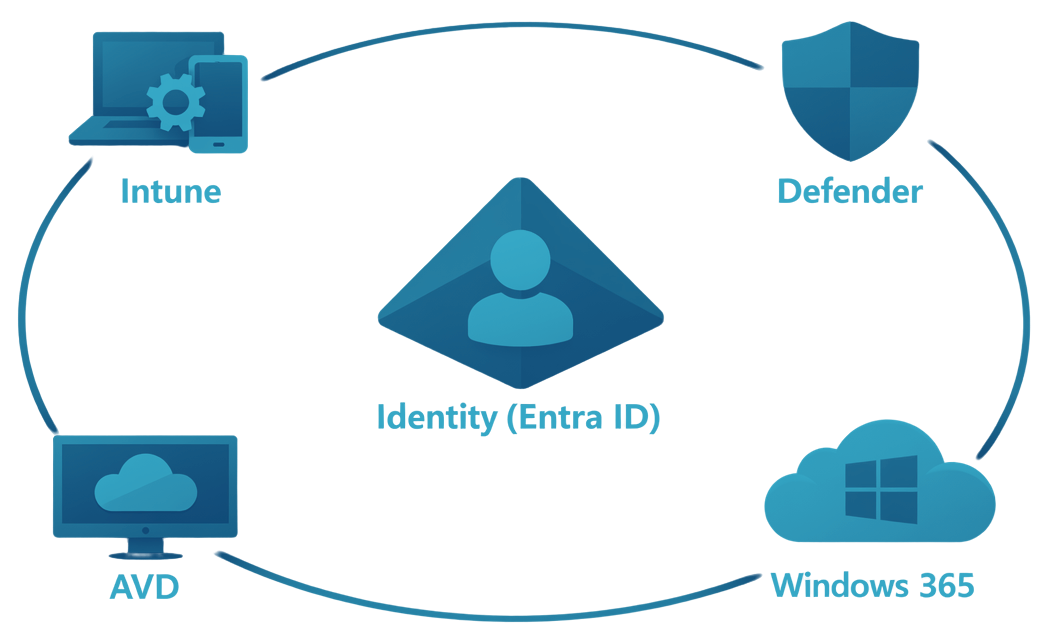
For businesses already invested in Microsoft 365, Entra ID, Intune, and Defender, AVD and Windows 365 slot in naturally. Identity, security, device management, and access policies work together without complex integrations or parallel tooling. Horizon can integrate, but it doesn’t feel native in the same way.
-
Security models have evolved
Modern desktop strategies assume devices will be lost, compromised, or unmanaged at times. Windows 365 and AVD are built with Zero Trust principles in mind: identity-based access, conditional access, data staying in the cloud, and rapid recovery when things go wrong. This is increasingly difficult to replicate cleanly in legacy, on-prem VDI designs.
-
User experience expectations have changed
Users expect fast access, consistent performance, and the ability to work from anywhere, without jumping through hoops. Windows 365, in particular, reframes the desktop as a personal, persistent Cloud PC rather than a pooled resource. That subtle shift makes a big difference in day-to-day usability.
AVD vs Windows 365: Not One or the Other
One common misconception is that organizations must choose between AVD or Windows 365. In reality, many successful migrations use both.
The goal is to design a desktop strategy that matches different user needs with the right delivery model.
How to Prepare for the Move
This is where many migrations succeed or stumble.

1. Start with user personas
Before touching architecture, map how people actually work. Who needs a persistent desktop? Who can share pooled resources? Who needs high performance, and who just needs reliable access? Horizon environments often treat users uniformly; cloud desktops work best when tailored.
2. Clean up identity and access first
AVD and Windows 365 are identity-driven. If Entra ID, Conditional Access, MFA, and device compliance policies aren’t solid, those cracks will show quickly. Getting identity right upfront reduces friction later and improves security from day one.
3. Rethink application delivery
This is a chance to modernize. Move away from image sprawl and manual app installs toward Intune, MSIX, and policy-based deployment. Fewer images, more automation, and faster change cycles.
4. Plan for coexistence, not big-bang cutovers
Most businesses don’t move everything at once. Running Horizon alongside AVD or Windows 365 for a period allows you to validate performance, user experience, and cost models without disrupting the business.
5. Build resilience into the design
One of the biggest advantages of Windows 365 is how well it supports business continuity. Features like Windows 365 Reserve Cloud PC allow users to stay productive during device loss or security incidents. This is where cloud desktops stop being “VDI” and start being an operational safety net.
Conclusion
Businesses that succeed don’t just migrate workloads. They rethink how desktops are delivered, secured, and recovered, with the assumption that disruption will happen, and productivity shouldn’t stop when it does.
That’s the opportunity AVD and Windows 365 unlock when done right.
Download the MDM Migration Guide
By reading the guide, you’ll learn:
-
How to plan and configure your new environment build.
-
Three ways to test and validate your migration before it begins.
-
How to segment and support users to ensure rapid adoption.

Andrew Reade
Andrew is our Digital Marketing Manager and oversees web-based marketing strategies and content creation for the organization. As a marketing veteran, Andrew has worked with organizations of all sizes in a diverse group of industries, from Risk Management to Transportation. Joining the organization in 2021, Andrew is based in Mobile Mentor’s Nashville, TN office.