Artificial intelligence has become one of the fastest workplace technology shifts in decades. Employees are using AI to summarize meetings, draft communications, automate repetitive tasks, analyze information, and improve productivity.
But access to AI tools does not automatically translate into meaningful business value.
The growing challenge for businesses is AI enablement: giving employees the skills, guidance, workflows, and guardrails they need to use AI effectively and responsibly.
The 2026 Endpoint Ecosystem Study examines how employees across the United States, United Kingdom, Australia, and New Zealand engage with workplace technology. The study surveyed more than 2,500 employees across areas including security, productivity, devices, onboarding, IT support, and AI adoption.
Its findings reveal an important disconnect: AI adoption is accelerating faster than AI enablement.
What the 2026 Endpoint Ecosystem Study Reveals
The study’s AI findings point to three related challenges: limited reported value, inconsistent training, and unequal readiness across employee groups.
Most employees are not yet reporting meaningful AI value
While AI tools are becoming more common in the workplace, the 2026 Endpoint Ecosystem Study found that only 29% of employees say AI delivers regular or essential value in their work.
Meanwhile, 48% report receiving no AI training or are unsure whether training exists.
These findings suggest that simply making AI available is not enough to ensure employees understand how to apply it effectively. A business may have widespread access to Copilot or other AI tools while still seeing limited day-to-day value.
The gap may reflect differences in training, role relevance, access to useful data, workflow integration, and employee confidence.
The question is no longer just whether employees have AI. It is whether they know how to use it well.
AI value varies across employee roles
The study’s role-based findings show that AI value is not evenly distributed across the workforce. The chart below illustrates reported AI value among managers and executives, knowledge workers, and frontline workers.
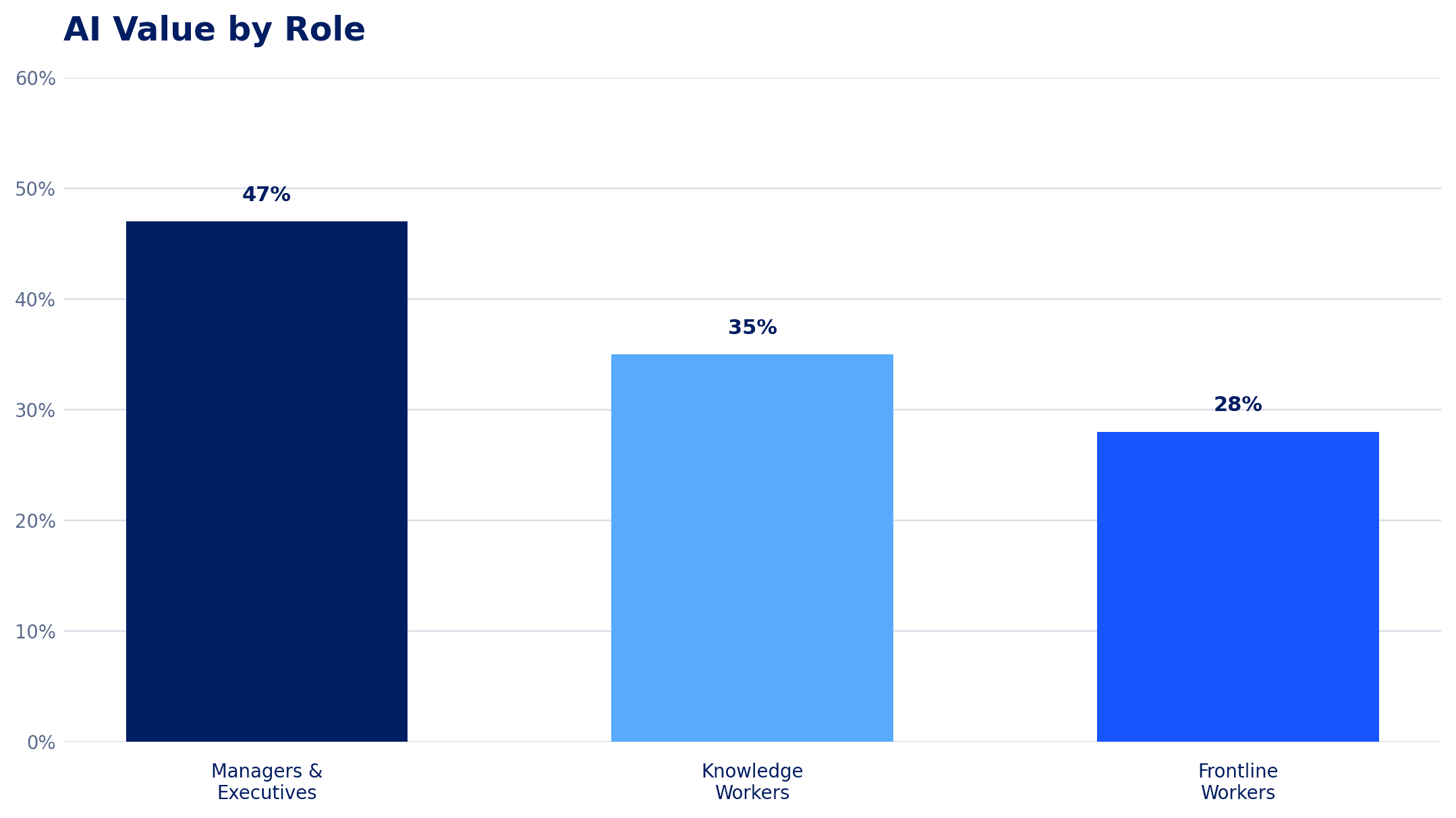
This disparity matters because AI enablement programs often focus first on office-based knowledge workers and leadership, while frontline employees may have less access to training, fewer opportunities to experiment, or workflows that are harder to connect to AI tools.
The study also highlights differences in AI usage across roles, reinforcing the need to consider the full workforce when developing an AI strategy.
AI enablement should reflect how people actually work, not simply which licenses they have been assigned.
Role-specific training is associated with greater reported AI value
One of the study’s clearest findings is the relationship between training relevance and reported value.
Employees who receive role-specific AI training are more than three times as likely to report meaningful AI value compared with employees receiving no training.
The chart below illustrates the reported relationship between training type and AI value.
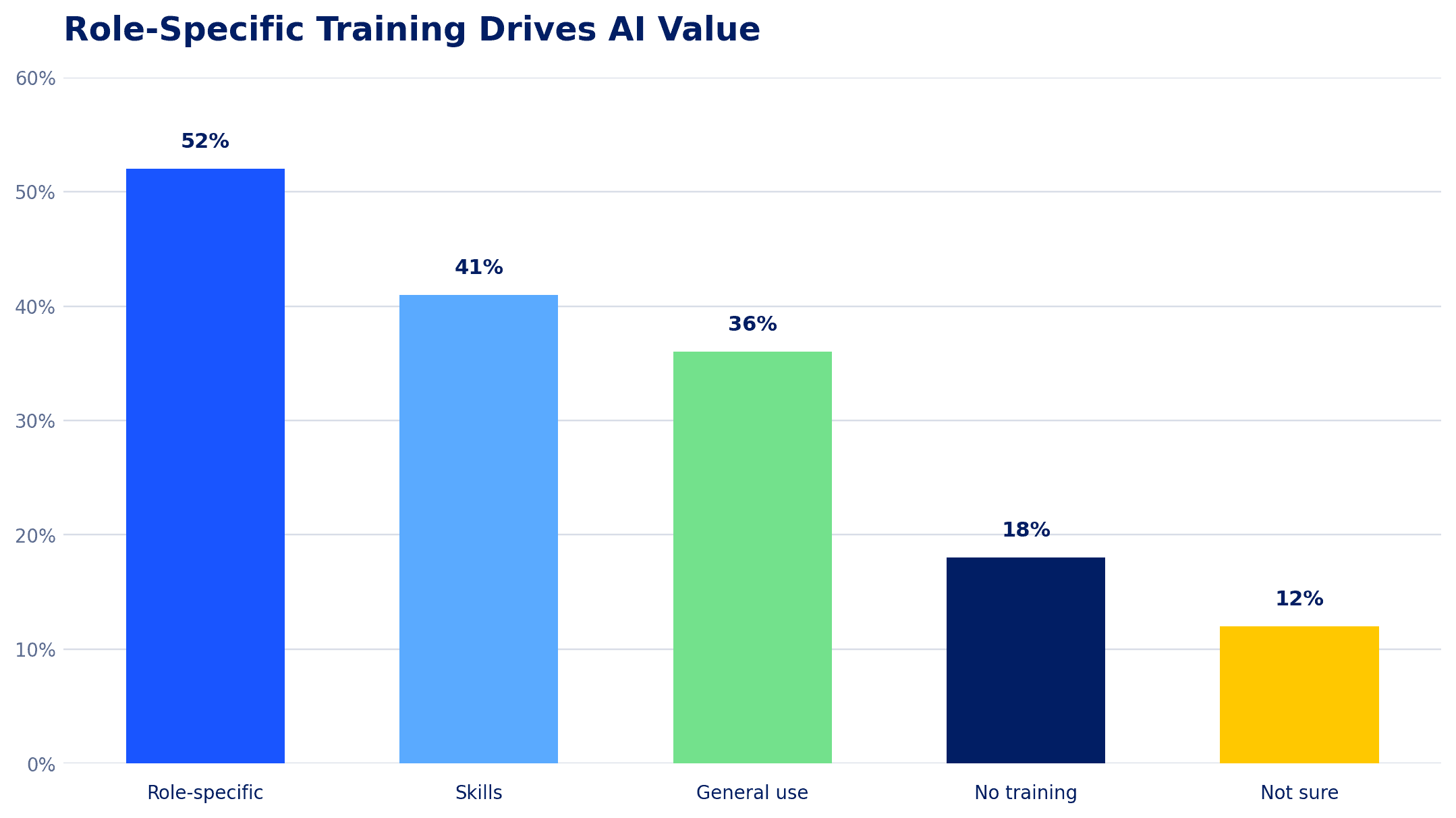
The chart shows reported AI value at 52% among employees receiving role-specific training, compared with 18% among those receiving no training.
This is an association, not proof that training alone causes the difference. Other factors, such as job role, access to tools, leadership support, and employee motivation, may also influence the results.
Still, the implication for businesses is practical: training is more useful when employees can immediately connect it to the work they do.
A general introduction to AI may create awareness. Role-specific enablement helps create habits.
AI training remains inconsistent
The study also found that nearly half of employees report receiving no AI training or are unsure whether training exists.
The training breakdown in the chart below shows:
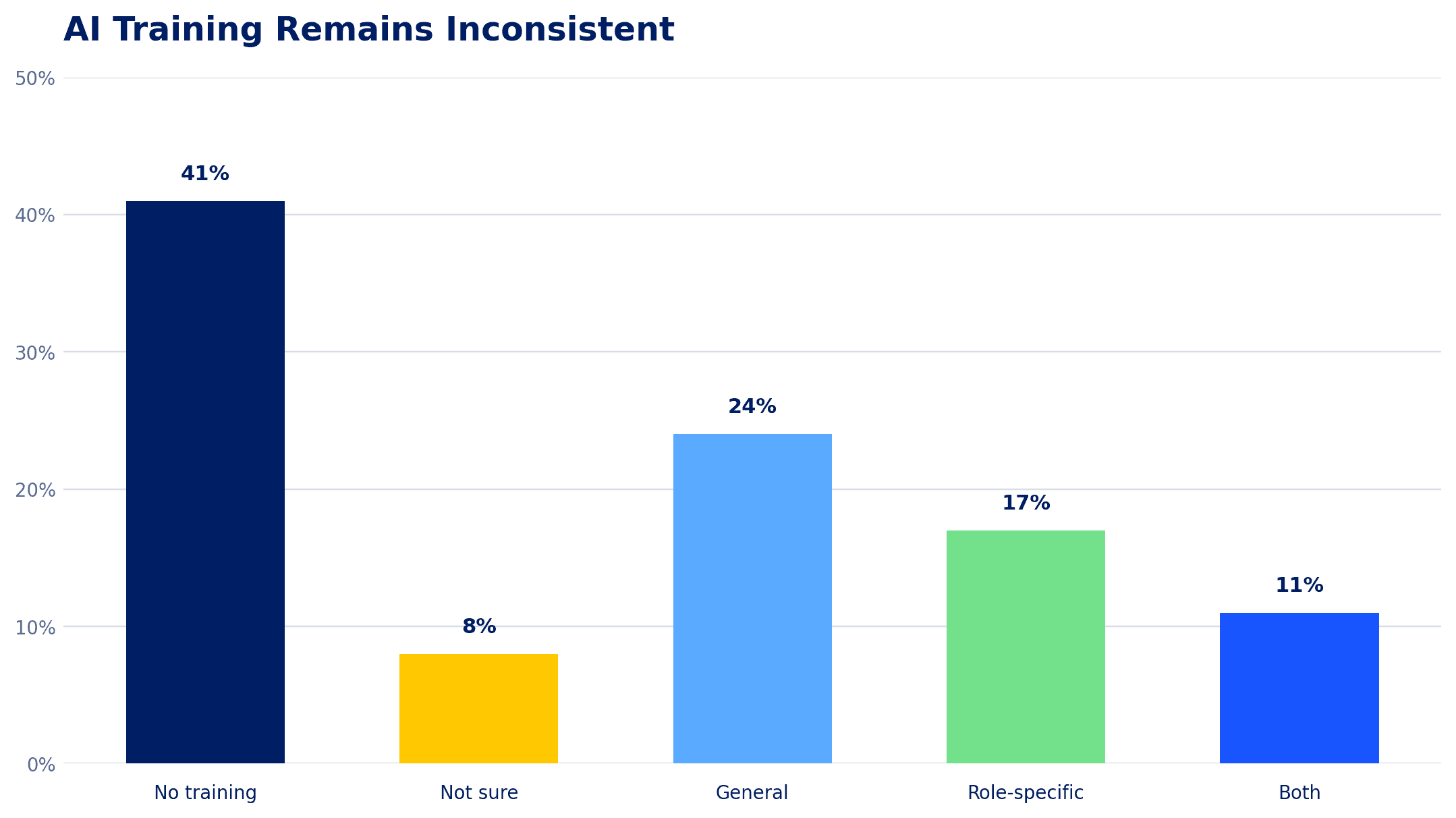
When employees have access to AI but lack clear guidance, adoption can become fragmented. Some discover valuable workflows independently, while others may not know where to begin. Teams may also develop inconsistent practices for prompting, reviewing, and sharing AI-generated work.
This creates a challenge that extends beyond technology deployment. It becomes a question of workforce readiness.
The Challenge Is Governed Adoption
The question is no longer simply whether employees will use AI. In many organizations, they already are.
The more important question is whether organizations can guide adoption effectively before employees create their own informal systems and workflows.
The 2026 Endpoint Ecosystem Study found that 67% of employees report that they at least sometimes work around company policies or controls to get their job done, while 47% say non-work apps, such as personal email, messaging, and file-sharing tools, are often more efficient than company-approved systems.
These findings are not exclusively about AI, but they provide important context. AI is being introduced into workplace environments where technology friction, inconsistent processes, and gaps in employee enablement already exist.
Without a coordinated approach, AI adoption can create new inconsistencies:
The next phase of AI maturity will require organizations to make AI practical, role-specific, governed, and integrated into everyday work.
So, what does that look like in practice?
Five Practical Ways to Close the AI Enablement Gap
The Copilot Mentoring program provides a framework for connecting AI strategy, workforce enablement, security, and measurable outcomes.
The program is organized around five workstreams: Business Analysis, Data Readiness, User Empowerment, Agents and APIs, and Leadership and Governance.
-
Start With Business Use Cases, Not the Technology
One of the most common mistakes businesses make is beginning with the question, “What can Copilot do?”
A more productive question is:
Where are employees spending time on repetitive, manual, or information-heavy work that AI could improve?
Start by identifying a small number of high-value use cases within each department.
Examples include:
The goal is to connect AI to a measurable business problem. A use case should have a clear owner, a defined workflow, and a way to evaluate whether it is helping.
Mobile Mentor’s Copilot Mentoring program begins with Business Analysis, which focuses on identifying where Microsoft 365 Copilot can deliver value and helping organizations deploy it to the right people.
-
Build Role-Based Enablement, Not Generic AI Training
A 60-minute overview of AI can create awareness, but it rarely changes how an employee works on Monday morning.
Effective enablement should connect directly to the employee’s role, tools, and daily responsibilities.
What role-based enablement can look like:
People managers
Sales professionals
Marketing professionals
Frontline professionals
Training should also include hands-on practice. Employees need opportunities to try real prompts, evaluate outputs, refine their approach, and understand when human review is required.
Mobile Mentor’s User Empowerment workstream focuses on building the skills and habits that help employees use Copilot productively.
-
Establish Data Readiness Before Scaling AI
AI enablement is not only a training challenge. It is also a data and security challenge.
Microsoft 365 Copilot can work across information stored in services such as Microsoft Teams, SharePoint, Outlook, and OneDrive. If permissions, data classification, or access controls are poorly managed, AI may surface information to users who already have access to it but should not have had that access in the first place.
This is where AI enablement intersects with data governance. Employees need clear guidance, but the organization also needs technical controls that support responsible use.
Mobile Mentor’s Data Readiness workstream focuses on preparing the data environment and addressing oversharing risks before AI is broadly deployed.
-
Create an AI Champion Network and Ongoing Support
One-time training is rarely enough to establish lasting behavior change. AI tools evolve quickly, and employees discover new use cases as they become more comfortable.
An AI champion network can help organizations maintain momentum.
Champions are employees who receive deeper training and help their teams:
Champions should not replace IT, security, or formal training. Their role is to make enablement more accessible and relevant within each department.
Organizations can support this network with:
This creates a feedback loop where enablement is continuously improved rather than treated as a one-time launch activity.
-
Connect AI Adoption to Governance, Agents, and ROI
As employees become more capable with AI, organizations will begin moving beyond individual productivity tasks toward more connected workflows and AI agents.
That transition requires additional planning.
An AI agent that helps answer questions is different from an agent that takes action across systems. Organizations need to consider:
Mobile Mentor’s Copilot Mentoring framework includes Agents and APIs as well as Leadership and Governance, connecting technical implementation with oversight and ROI measurement.
Measure more than license utilization
A successful AI program should not be measured only by how many licenses are assigned or how often employees open Copilot.
Instead, organizations should establish a combination of adoption, capability, and business-impact metrics.
| Category | Example metrics |
|---|---|
| Adoption | Active users, recurring usage, department participation, and use-case adoption. |
| Capability | Training completion, confidence surveys, role-based proficiency, and champion participation. |
| Productivity | Time saved on defined tasks, reduced administrative effort, and faster completion of workflows. |
| Quality | Reduced rework, improved consistency, and employee or customer experience measures. |
| Risk and governance | Policy adoption, data-protection findings, approved use cases, and agent oversight. |
The objective is to understand whether AI is becoming part of productive, responsible work, and where additional support is needed.
Get in Touch With the Mobile Mentor Team to Learn More

Andrew Reade
Andrew is our Digital Marketing Manager and oversees web-based marketing strategies and content creation for the organization. As a marketing veteran, Andrew has worked with organizations of all sizes in a diverse group of industries, from Risk Management to Transportation. Joining the organization in 2021, Andrew is based in Mobile Mentor’s Nashville, TN office.