
Microsoft is expanding the AI models available in Copilot, giving eligible customers access to Grok models from SpaceXAI in Word, Excel, and PowerPoint. For IT administrators, this introduces a new configuration decision: whether these models should be available within their business’s Microsoft 365 environment.
The change began rolling out to eligible Microsoft Frontier customers on September 18, 2026. Here’s what IT teams need to know and how to prepare.
What Is Changing?
Microsoft is adding SpaceXAI as a subprocessor for Microsoft Copilot, enabling the use of Grok models for eligible Frontier customers.
A subprocessor is a third-party service provider that processes data on behalf of another organization. In this case, the addition of SpaceXAI supports the integration of Grok models into select Microsoft 365 Copilot experiences.
The change gives businesses another AI model option within familiar productivity applications, including Word, Excel, and PowerPoint. However, access to these models introduces an additional consideration for IT administrators responsible for security, compliance, and AI governance.
We recommend the following steps:
How Will This Affect Your Business?
The impact depends on your eligibility, existing Copilot configuration, and approach to AI governance.
Administrators will have a new setting to review. The SpaceXAI subprocessor setting allows administrators to decide whether Grok models should be available in their tenant. This gives IT teams an opportunity to evaluate the change against their security policies and AI adoption strategy.
AI governance policies may need to be revisited. Those developing policies around generative AI should consider which models employees can access, what data may be processed, and how third-party AI providers fit within existing compliance requirements.
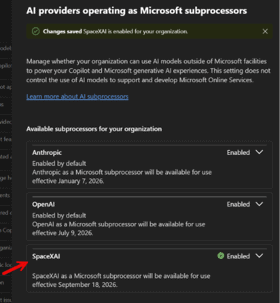
AI access should align with business needs. Additional models can provide more options for users, but broader access should be intentional. IT teams should understand the implications before enabling new AI capabilities across their environment.
What Should Microsoft 365 Administrators Do?
Rather than treating this as a routine product update, administrators should use the change as an opportunity to review their business’s approach to AI access and governance.
-
Review the SpaceXAI Subprocessor Setting
Check the relevant Microsoft 365 administration settings and determine whether the SpaceXAI subprocessor option is available for your tenant. Confirm your eligibility and understand the effect of enabling or disabling the setting before making changes.
-
Evaluate Security and Compliance Requirements
Review your existing policies for third-party AI services, data handling, privacy, and regulatory compliance. Determine whether the addition of SpaceXAI aligns with your business’s requirements and risk tolerance.
-
Establish an AI Access Policy
Decide which AI models employees should be able to use and under what circumstances. Consider business needs, data sensitivity, and user groups when determining access. An Information Architecture (IA) for AI provides a structured framework for defining how AI tools are accessed, governed, and used across an organization. Establishing this framework helps ensure new AI capabilities align with business objectives, security requirements, and data governance policies.
-
Communicate Changes to Stakeholders
Coordinate with security, compliance, legal, and business leaders before changing the setting. Clear communication helps ensure decisions about AI access reflect both organizational risk and employee productivity needs.
As discussed in The AI Enablement Gap: Why AI Adoption Depends on More Than Access, providing access to AI tools is only one part of successful adoption. Employees also need clear guidance, appropriate training, and an understanding of how to use AI responsibly. Communicating changes to AI capabilities and access policies helps organizations establish consistent practices while supporting productive, secure AI use.
-
Continue Monitoring Microsoft’s AI Updates
Microsoft’s AI capabilities and configuration options continue to evolve. Establish a process for reviewing new features, subprocessor changes, and administrative controls so your policies remain aligned with the services your organization uses.
Make AI Adoption a Deliberate Decision
The addition of SpaceXAI as a Microsoft Copilot subprocessor reflects the broader expansion of AI capabilities across Microsoft 365. For organizations, the opportunity is to take advantage of new capabilities while maintaining appropriate oversight of how AI is accessed and used.
The key is to make these decisions intentionally. Reviewing administrative settings, establishing clear governance policies, and involving the right stakeholders can help your business balance innovation with security and compliance.


Andrew Reade
Andrew is our Digital Marketing Manager and oversees web-based marketing strategies and content creation for the organization. As a marketing veteran, Andrew has worked with organizations of all sizes in a diverse group of industries, from Risk Management to Transportation. Joining the organization in 2021, Andrew is based in Mobile Mentor’s Nashville, TN office.