
Generative AI is changing how employees work. People use ChatGPT, Claude, Microsoft 365 Copilot and other AI tools to analyze data, summarize documents, write content and solve problems.
But there’s a growing data security question businesses need to answer:
Are employees putting sensitive company information into AI tools?
Research from the 2026 Endpoint Ecosystem Study suggests the concern is more than theoretical. Among the 2,500+ employees surveyed across the U.S., U.K., Australia and New Zealand, 67% reported bypassing organizational controls to get work done more efficiently, while 47% said non-work tools can be more efficient than their organization’s approved tools.
When employees can find a faster way to accomplish a task, they may use tools outside the business’ security controls.
That creates a new data security challenge.
What types of company data are employees putting into AI?
An employee may upload a spreadsheet, paste a customer record into a chatbot or ask an AI tool to summarize a confidential document. The intent may be harmless, but the business still needs to know what information is being shared, where it’s going and whether it should be protected.
Potentially sensitive information can include:
This creates a new form of AI data leakage. Instead of sensitive information leaving the business through email or file sharing, it may be copied directly into an AI application.
The Endpoint Ecosystem Study also found that 48% of employees reported receiving no AI training or were unsure whether they had received it. If employees don’t know what information is appropriate to share with AI, security policies alone may not be enough.
That’s why AI security needs to become part of an organization’s broader data security strategy.
How can you detect sensitive data being shared with AI?
The first step is visibility.
Organizations need to understand which AI applications employees are using and whether sensitive information is being pasted or uploaded to those applications.
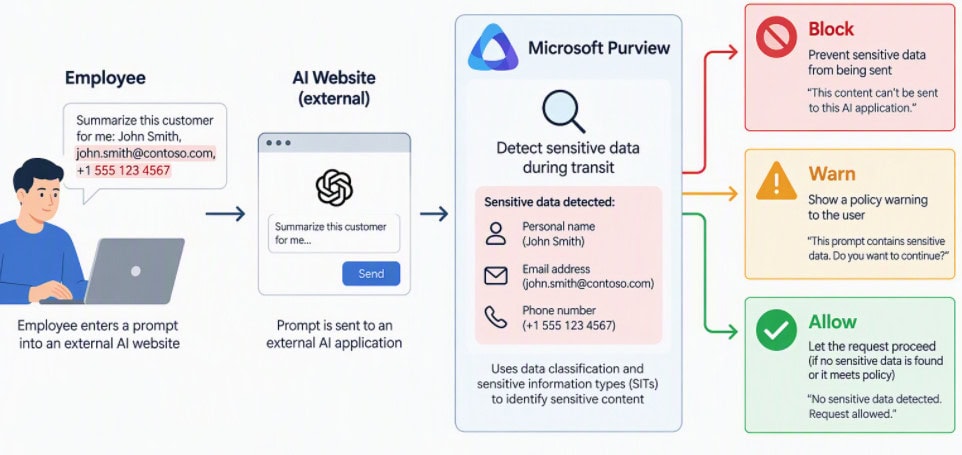
Microsoft Purview provides capabilities to help organizations discover sensitive information, identify data security risks and apply controls to AI-related activity. For supported scenarios, Endpoint Data Loss Prevention can detect sensitive information being pasted or uploaded to AI websites and apply organizational policies.
This allows organizations to move beyond simply asking:
“Should employees use AI?”
Instead, the question becomes:
“How can employees use AI without exposing sensitive information?”
Can Microsoft Purview find sensitive documents employees shouldn’t have access to?
AI security starts with the data itself.
If hundreds of employees already have access to sensitive documents in SharePoint or OneDrive, an organization has a data exposure problem before anyone opens a public AI tool like ChatGPT.
Microsoft Purview can help organizations identify sensitive information, understand where it exists and identify potential oversharing across Microsoft 365.
Organizations should regularly ask:
Reducing unnecessary access is an important part of preparing for AI.
How does Microsoft 365 Copilot fit into data security?
Microsoft 365 Copilot brings AI into the Microsoft 365 environment and works with information a user is authorized to access.
That makes permissions and data governance especially important.
If an employee has access to a sensitive SharePoint site, Copilot may be able to use information from that site as part of the user’s authorized experience.
Copilot doesn’t eliminate the need for good data governance. It makes it more important.
Before expanding Copilot access, organizations should review:
The key question is not simply:
“Can Copilot access our data?”
It’s:
“What data can each user access, and should they have that access?”
How can you prevent employees from uploading sensitive data to ChatGPT?
Organizations don’t necessarily need to choose between unrestricted AI access and banning AI altogether.
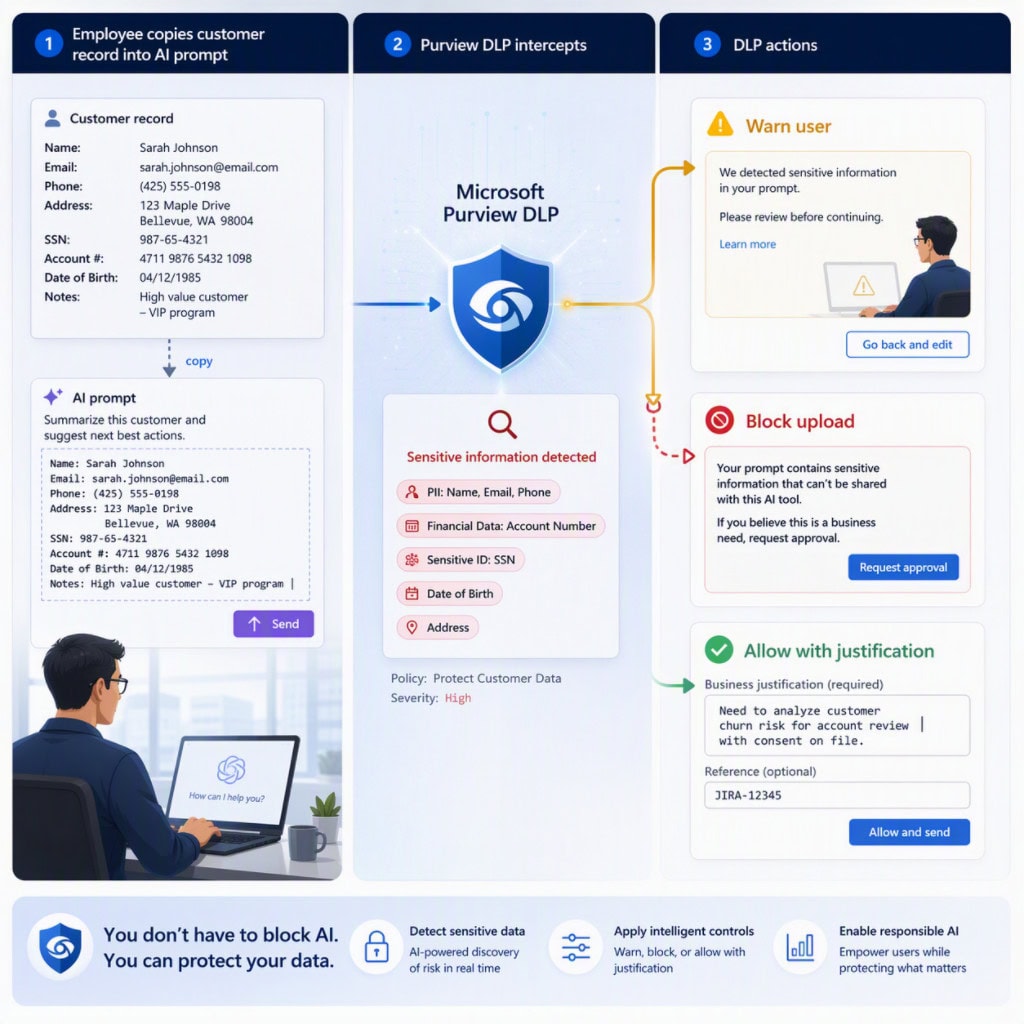
Microsoft Purview can provide controls around sensitive information, including sensitivity labels and Data Loss Prevention policies. Depending on the organization’s requirements, policies can warn users, restrict actions or block inappropriate sharing.
That creates a more practical approach to AI security:
Allow productive AI use while protecting sensitive information.
This is particularly important when employees perceive external AI tools as easier or more effective. If 47% of employees say non-work tools are more efficient, simply telling employees not to use them may not address the underlying productivity problem.
Organizations need both secure tools and clear guardrails.
Is banning public AI tools enough?
Probably not as a complete data security strategy.
Employees may use other AI applications, personal devices or new services that haven’t been approved by IT.
The Endpoint Ecosystem Study found that 67% of employees reported bypassing controls to get work done more efficiently. That suggests organizations should consider not only which tools are prohibited, but why employees feel the need to work around existing controls.
Instead of focusing exclusively on which AI applications employees can use, organizations can focus on what information employees are allowed to share with them.
That is where data classification, permissions, DLP and monitoring become important.
A better approach to AI data security
AI adoption and data security shouldn’t be treated as separate initiatives.
A practical approach is:
Discover: Where is sensitive data, and which AI tools are employees using?
Classify: Which information requires additional protection?
Govern: Who should have access to sensitive information?
Protect: What can employees share, copy or upload?
Monitor: Are employees interacting with sensitive information in risky ways?
Respond: What happens when a policy is violated?
Microsoft Purview provides the data security foundation for this approach, while Microsoft 365 Copilot gives employees a powerful AI experience within the Microsoft ecosystem.
Before deploying more AI, ask these questions
AI security starts with understanding your data and your users.
The 2026 Endpoint Ecosystem Study shows why both matter. Employees are looking for more efficient ways to work, and some are willing to bypass controls when existing tools don’t meet their needs. At the same time, many employees may not have clear guidance on how to use AI securely.
Microsoft Purview can help organizations discover, classify, govern and protect their data, while Microsoft 365 Copilot helps employees put AI to work within the Microsoft ecosystem.
The goal isn’t to stop employees from using AI. It’s to give them the productivity benefits of AI without putting sensitive company information at unnecessary risk.
Get in Touch With the Mobile Mentor Team to Learn More

Andrew Reade
Andrew is our Digital Marketing Manager and oversees web-based marketing strategies and content creation for the organization. As a marketing veteran, Andrew has worked with organizations of all sizes in a diverse group of industries, from Risk Management to Transportation. Joining the organization in 2021, Andrew is based in Mobile Mentor’s Nashville, TN office.