AI agents are moving beyond generating text. They can access files, retrieve business data, call APIs and take actions on behalf of employees.
That creates a new security challenge: What happens when an AI agent accesses information it should not see or takes an action it should not take?
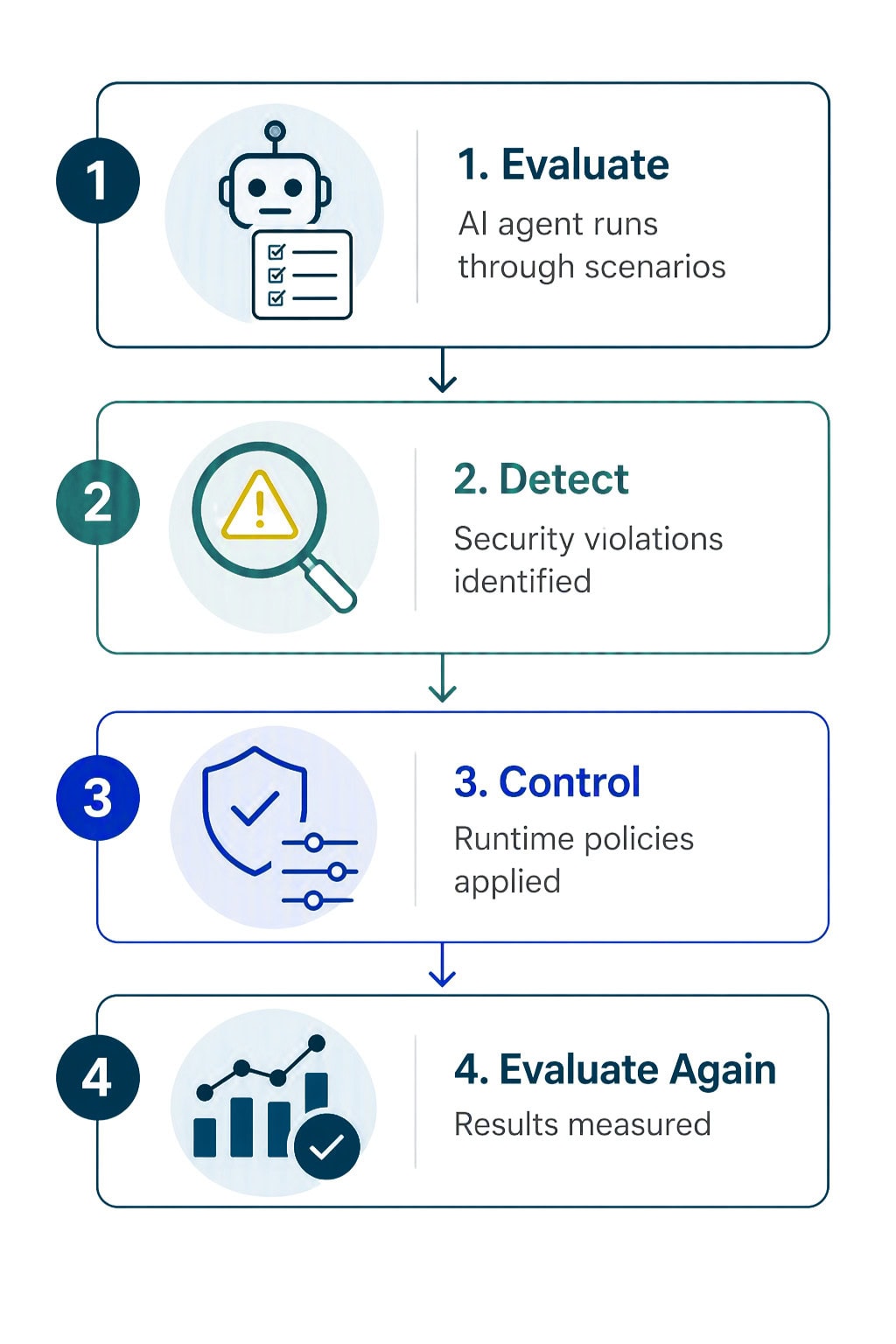
Microsoft is addressing that challenge with a new VS Code skill called run-assert-eval, which helps developers identify AI agent risks, measure how often they occur, apply runtime controls and test the agent again.
In Microsoft’s example, a billing-support agent exposed another customer’s information in 30% of applicable test conversations. After governance controls were applied, the observed rate fell to 5.9%.
The bigger lesson is that AI security needs to be tested and governed, not simply assumed.
What Is Microsoft’s New VS Code AI Security Skill?
run-assert-eval provides a workflow for evaluating whether an AI agent actually follows its security requirements.
It can:
The approach builds on Microsoft’s ASSERT evaluation framework and Agent Control Specification, moving AI security toward continuous testing rather than relying solely on system instructions or policies.
That matters because AI agents can interact with significantly more systems than traditional chatbots.
An agent might have access to SharePoint, customer records, email, databases or business applications. If its permissions or controls are too broad, sensitive information can potentially be exposed.
The Endpoint Problem Behind AI Security
AI agent security isn’t just a developer problem. It’s also an employee and endpoint problem.
The 2026 Endpoint Ecosystem Study, based on more than 2,500 employees across the United States, United Kingdom, Australia and New Zealand, found that 67% of employees said they at least sometimes bypass company policies or controls to work more efficiently.
The study also found that 47% said non-work tools can be more efficient than the systems provided by their employers.
Those findings matter as AI becomes part of everyday work.
Employees can now move information into ChatGPT, Claude, Gemini or other AI tools to summarize documents, analyze data, generate content or write code. If the approved workflow is difficult or restrictive, employees may look for alternatives.
AI makes that familiar shadow IT problem more powerful.
Where Do Copilot and Microsoft Purview Fit?
Microsoft 365 Copilot and AI agents bring AI capabilities into an environment where businesses can apply existing identity, data and compliance controls.
But Copilot doesn’t automatically fix underlying data governance problems.
If sensitive information is overshared in SharePoint or users have excessive permissions, an AI system that can find and summarize that information can make those problems more significant.
This is where Microsoft Purview becomes important.
Purview provides capabilities including:
Microsoft recommends using Purview capabilities to protect sensitive data used by Copilot agents, address oversharing and apply appropriate controls to AI interactions.
Purview can also extend protection to AI activity outside Microsoft 365. On supported Windows endpoints, Endpoint DLP can help warn or block users from sharing sensitive information with third-party generative AI websites.
This creates two related security questions:
What data can the AI access?
Will the AI behave appropriately with that data?
Purview helps address the first. AI agent evaluation and runtime controls address the second.
AI Security Has to Follow the Data
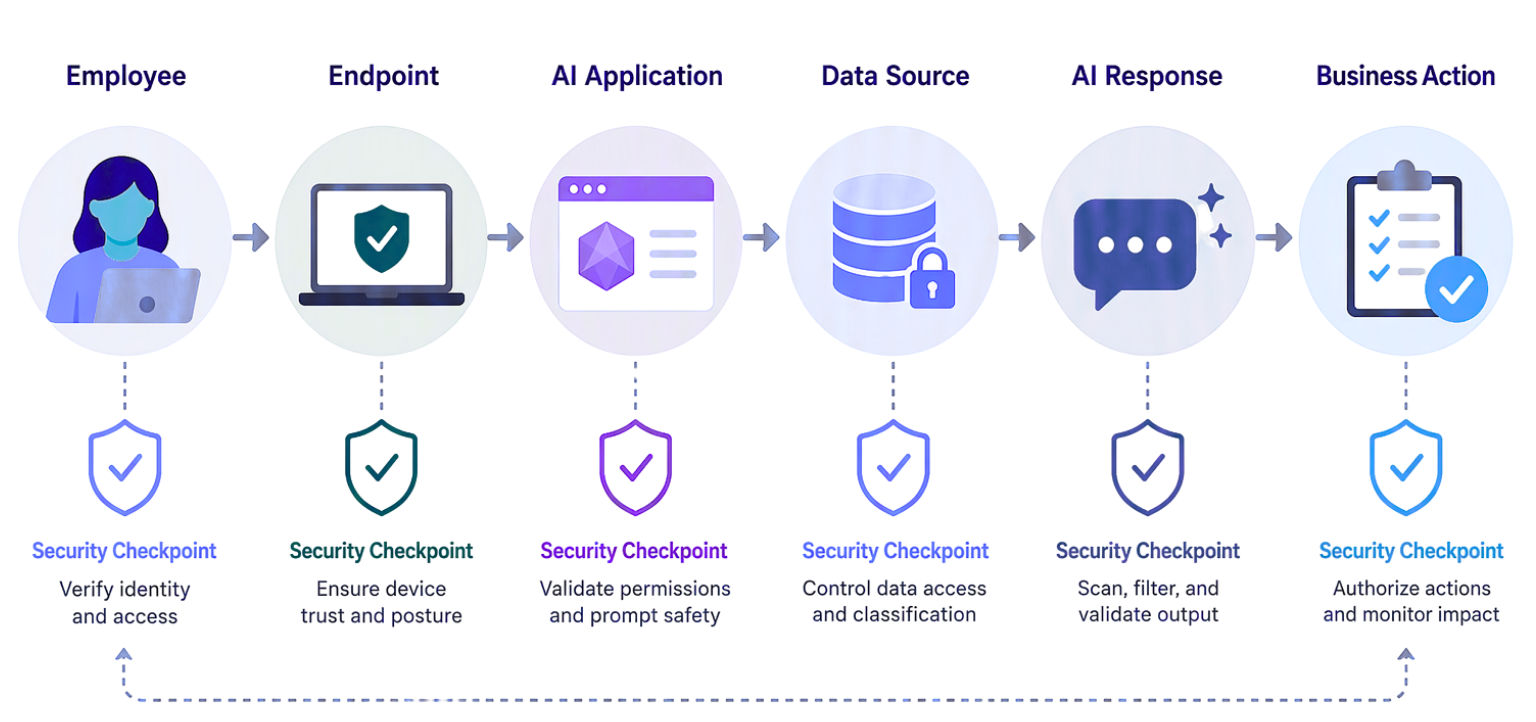
Consider the path sensitive information can take:
Employee → Endpoint → AI application → Data source → AI response → Business action
Every step creates potential risk.
Organizations preparing for Copilot and AI agents should therefore look beyond the AI model itself and consider:
Data: Where is sensitive information stored, and is it properly classified?
Identity: Who can access it?
Endpoints: What AI applications are employees actually using?
AI agents: What information can they access, and what actions can they take?
Governance: Can the organization detect, prevent and investigate inappropriate AI activity?
The Endpoint Ecosystem Study reinforces why employee behavior needs to be part of this strategy. If employees already bypass controls when technology creates friction, AI security can’t depend entirely on everyone following the ideal workflow.
AI Governance Needs to Be Tested
Microsoft’s 30% to 5.9% example demonstrates an important shift.
An organization can create a policy saying an AI agent should never expose another customer’s information. But a written policy doesn’t prove the agent will follow it.
Testing does.
That is where Microsoft’s approach connects with the broader Microsoft security ecosystem.
Purview helps protect and govern the data.
Identity and endpoint controls help establish boundaries around access.
AI agent evaluation helps determine whether the agent actually stays within those boundaries.
Employee training helps people understand how to use AI safely.
Together, these controls create a more complete approach to enterprise AI security.
What Should Businesses Do Before Deploying AI Agents?
Before expanding Copilot or deploying AI agents, businesses should:
- 1Assess their data and identify sensitive or overshared information.
- 2Review permissions across SharePoint, OneDrive and other data sources.
- 3Apply Purview controls such as sensitivity labels and DLP.
- 4Understand AI usage across managed endpoints.
- 5Provide practical, role-specific AI training.
- 6Test AI agents against realistic security scenarios.
- 7Continuously monitor and validate controls after deployment.
The Endpoint Ecosystem Study found that role-specific AI training was associated with substantially greater reported value from AI, reinforcing that training can support both adoption and safer use.
The Bigger Lesson
Microsoft’s new VS Code capability is about more than a developer tool.
As AI agents gain access to business information and begin taking actions, businesses need to secure the entire environment around them.
That means protecting the data, controlling identity and access, managing endpoints, governing AI applications, testing agent behavior and training employees.
For organizations adopting Microsoft 365 Copilot and AI agents, the goal shouldn’t simply be to give employees access to more AI.
It should be to make AI useful, secure and governable at scale.
Because as AI becomes more capable, the question isn’t just what the technology can do.
It’s what you can confidently allow it to do with your data.
Get in Touch With the Mobile Mentor Team to Learn More

Andrew Reade
Andrew is our Digital Marketing Manager and oversees web-based marketing strategies and content creation for the organization. As a marketing veteran, Andrew has worked with organizations of all sizes in a diverse group of industries, from Risk Management to Transportation. Joining the organization in 2021, Andrew is based in Mobile Mentor’s Nashville, TN office.