 Microsoft Entra ID P1 and P2 are identity and access management licenses that help organizations secure sign-ins, manage access, and reduce account-related risk. The practical difference is simple: Entra ID P1 gives most businesses the policy foundation they need, while Entra ID P2 adds risk detection, privileged access controls, and deeper identity protection for higher-risk environments. If you are weighing Entra ID P1 vs P2, start with your security posture, not just the feature list.
What is the real difference between Entra ID P1 and P2?
The real difference between Entra ID P1 and P2 is that P1 focuses on enforcing access rules, while P2 helps detect identity risk and govern privileged access more actively. Microsoft describes Entra ID P1 as adding hybrid access and advanced administration features such as dynamic groups and self-service password reset for on-premises users; Entra ID P2 includes the P1 capabilities plus Microsoft Entra ID Protection and Privileged Identity Management.
That distinction matters in day-to-day operations. With Entra P1, you can require MFA through Conditional Access, route access based on user, device, app, or location signals, and support hybrid identity scenarios. With Entra P2, you can go further by using risk-based policies, investigating risky users, and giving administrators just-in-time access instead of permanent standing privileges.
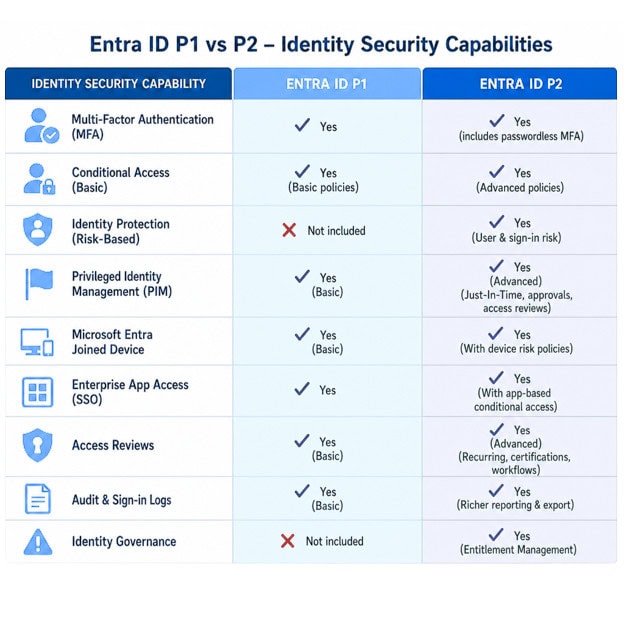
Entra ID P1 builds the access control foundation
For many businesses, an Entra ID P1 license is the point where Microsoft identity security becomes operational rather than basic. Conditional Access is the headline capability because it lets admins define rules such as requiring MFA outside trusted locations, blocking legacy authentication, or demanding compliant devices for sensitive apps. Microsoft identifies Conditional Access as requiring Entra ID P1, with Microsoft 365 Business Premium customers also receiving access to the feature.
P1 is also useful when identity is spread across cloud and on-premises systems. It supports advanced administration capabilities that help hybrid users access both on-premises and cloud resources, including dynamic groups, self-service group management, and password reset writeback scenarios.
Common P1 use cases include:
- Baseline Zero Trust access policies: Require MFA, block risky conditions you can identify manually, and narrow access by group or application.
- Hybrid workforce support: Give users a more consistent sign-in and password reset experience across Microsoft 365 and connected environments.
- App access simplification: Use single sign-on and group-based access patterns to reduce password sprawl.
- Small and midsize business security upgrades: Move beyond security defaults into tailored access policies without buying every advanced governance feature.
The main limitation is that P1 does not deliver the full identity risk engine. You can create strong access rules, but you do not get the same depth of risk-based Conditional Access, risky user reporting, or privileged identity workflows that come with Entra id p2.
Entra ID P2 adds risk, privilege, and investigation capabilities
Entra ID P2 is built for businesses that need stronger detection and control around compromised accounts, privileged roles, and regulated access. Microsoft Entra ID Protection requires P2 and provides risk policies, risk-based Conditional Access, and reporting for identity risks.
The other major P2 capability is Privileged Identity Management, often shortened to PIM. PIM helps businesses role activation for Microsoft Entra, Azure, Microsoft 365, and other Microsoft services. Microsoft states that PIM requires Microsoft Entra ID P2 or Microsoft Entra ID Governance.
This is where the Entra P1 vs P2 decision becomes less about “more features” and more about risk appetite. If a compromised admin account would create serious business, legal, or operational exposure, P2 is easier to justify. If your security team needs visibility into risky sign-ins and risky users, P2 is usually the more appropriate tier.
Feature comparison at a glance
The table below gives a practical view of Entra id P1 vs p2 without treating every capability as equally important.
| Area | Entra ID P1 | Entra ID P2 |
|---|---|---|
| Conditional Access | Included for policy-based access control | Included, plus risk-based scenarios when used with ID Protection |
| MFA policy control | Supports granular MFA enforcement through Conditional Access | Supports granular MFA plus risk-triggered authentication responses |
| Hybrid identity administration | Strong fit for hybrid users and advanced admin needs | Includes P1 capabilities |
| Dynamic groups and self-service features | Included in P1 feature set | Included |
| Identity Protection | Not the full P2 risk engine | Included; supports risk policies and security reports |
| Privileged Identity Management | Not included as a P1 feature | Included through P2 or available through Entra ID Governance |
| Best fit | Standardized access control and hybrid identity | Higher-risk, compliance-driven, or admin-heavy environments |
A simple way to read this: Entra id P1 helps you decide who can access what under defined conditions; Entra id P2 helps you react when Microsoft detects that an identity or sign-in may be risky.
How should pricing and Microsoft 365 bundles affect the decision?
Pricing should affect the decision, but it should not be the first filter. Microsoft pricing pages list Entra ID P1 and P2 as standalone per-user subscriptions, and Microsoft also notes that P1 is available with Microsoft 365 E3 and Business Premium, while P2 is available with Microsoft 365 E5 for enterprise customers. Published prices and bundle packaging can vary by page, region, agreement, and time, so confirm current costs in your tenant or with your Microsoft licensing provider before budgeting.
The more important cost question is scope. If a Conditional Access policy applies to a user, that user generally needs the correct qualifying license. A Microsoft Q&A answer from a Microsoft moderator states that users who make use of Conditional Access need the Azure AD Premium P1 license applied.
For budgeting, ask three questions:
- Do we already own P1 or P2 through Microsoft 365? Many organizations comparing Entra id P1 vs P2 discover that their existing Microsoft 365 plan already includes one tier.
- Which users actually need advanced controls? Broad Conditional Access may require broad P1 coverage, while P2 may be prioritized for admins, high-risk roles, or regulated user groups depending on licensing rules and feature use.
- Are governance features separate from P2 in our scenario? Some access review and entitlement management capabilities may require Microsoft Entra ID Governance or Microsoft Entra Suite, not just a basic P2 assumption.
Governance is where licensing can get confusing
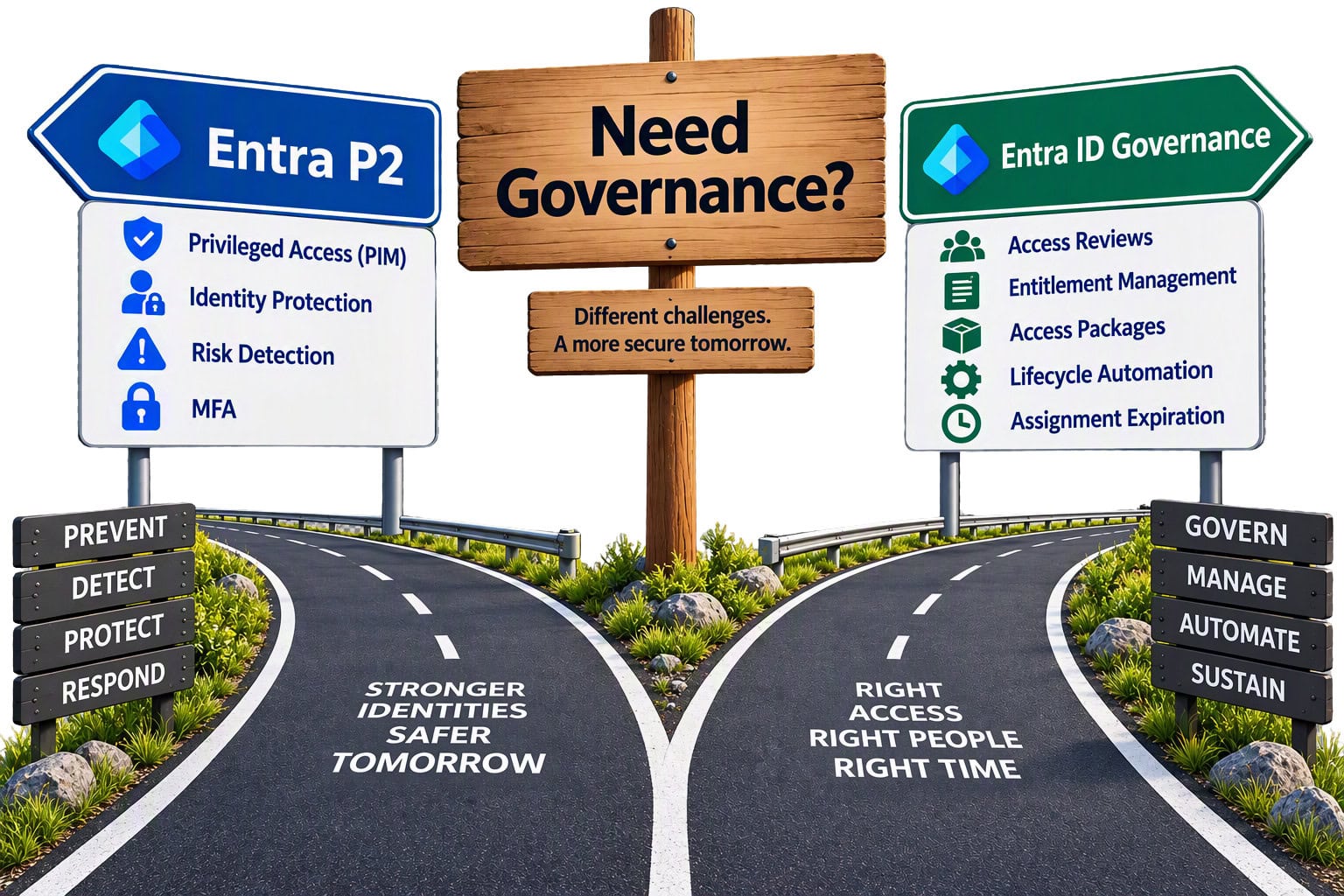
Many teams assume that buying Entra P2 automatically solves every identity governance need. That is not always the safest assumption. Microsoft documentation now frequently references Microsoft Entra ID Governance or Microsoft Entra Suite for access reviews, entitlement management, and access package review scenarios, while PIM can be licensed through P2 or Governance.
In practical terms, P2 is strongest when your priority is identity protection and privileged access. Entra ID Governance becomes important when the priority is lifecycle automation: access requests, approvals, periodic reviews, assignment expiration, and access packages at scale. Microsoft describes entitlement management as helping businesses manage identity and access lifecycles by automating access request workflows, assignments, reviews, and expiration.
If your compliance team asks, “Can we prove that access is reviewed and removed when no longer needed?” do not stop at the P1 license versus P2 comparison. Map the exact governance workflows you need, then verify whether P2, Entra ID Governance, Entra Suite, or a Microsoft 365 bundle covers them.
A practical decision framework
Use this checklist before choosing between Entra P1 and Entra p2:
- Choose Entra ID P1 if your main goal is Conditional Access, MFA enforcement, hybrid identity support, dynamic groups, and better self-service for users.
- Choose Entra ID P2 if you need risk-based Conditional Access, risky user investigation, Identity Protection, or PIM for privileged roles.
- Evaluate Entra ID Governance if you need structured access packages, recurring access reviews, approval workflows, or entitlement lifecycle automation.
- Review Microsoft 365 bundles first because you may already own P1 through E3 or Business Premium, or P2 through E5.
- License based on actual use rather than a feature wish list; policy scope, admin populations, and regulated users often drive the real cost.
This framework is especially helpful for a mid-sized company moving from Microsoft 365 E3. E3 may already cover the P1 foundation, so the upgrade conversation should focus on what is missing: risk-based decisions, privileged admin controls, or governance automation.
Which Businesses should choose P1 or P2?
Businesses should choose P1 when they need strong access control but do not yet require advanced identity risk detection or privileged access workflows. P2 is a better fit when the organization has elevated security risk, stricter compliance requirements, a larger admin footprint, or a Zero Trust roadmap that depends on automated risk signals.
A small business with Microsoft 365 Business Premium may get a strong security improvement from well-designed P1 Conditional Access policies. A financial services firm, healthcare organization, public sector agency, or enterprise with many administrators may need P2 because the cost of undetected account compromise is higher. A company with heavy contractor, guest, or project-based access may also need to look beyond P2 into Governance.
Conclusion
The best comparison of Entra ID P1 and P2 is not “basic versus advanced.” It is “policy enforcement versus risk-aware identity security.” Entra ID P1 gives you the foundation: Conditional Access, MFA control, hybrid identity features, and better administration. Entra ID P2 adds the tools security and compliance teams often need most: Identity Protection, risk-based Conditional Access, and Privileged Identity Management.
If you are unsure, audit your current Microsoft 365 licenses, list the policies you want to enforce, identify privileged users, and document any compliance review requirements. That exercise will usually make the right path clear: P1 for access control foundations, P2 for risk and privilege, and Governance or Suite when access lifecycle automation becomes a core requirement.

Andrew Reade
Andrew is our Digital Marketing Manager and oversees web-based marketing strategies and content creation for the organization. As a marketing veteran, Andrew has worked with organizations of all sizes in a diverse group of industries, from Risk Management to Transportation. Joining the organization in 2021, Andrew is based in Mobile Mentor’s Nashville, TN office.