
Microsoft has officially made Copilot Cowork generally available, and this marks an important shift in how businesses should think about AI.
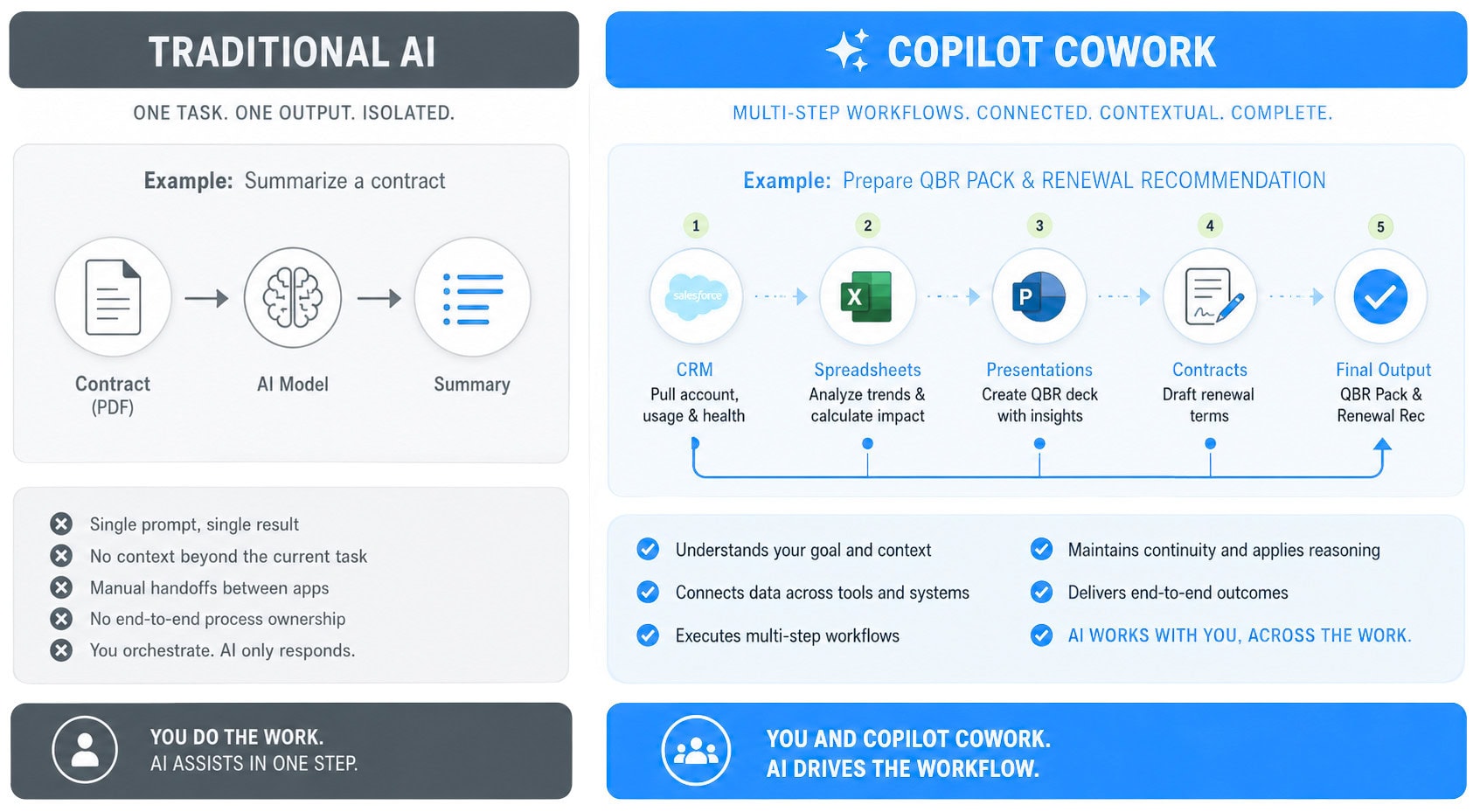
This is Microsoft’s first major move into agentic AI at scale inside the Microsoft 365 ecosystem. Instead of simply helping you do the work, Copilot Cowork can now complete multi-step tasks on your behalf.
Think of it like this:
You’re no longer asking Copilot for directions. You’re handing it the keys.
What is Copilot Cowork and how is it different?
Copilot Cowork is designed for long-running, multi-step business tasks.
That means instead of prompting for one isolated action, you can now assign an outcome.
Examples:
The real shift here is orchestration.
Copilot Cowork can pull context from your Microsoft 365 environment, reason across multiple data sources, use plugins, and execute workflows that span applications.
This is where AI moves from productivity tool to digital coworker.
And that changes everything.
Copilot Cowork browser automation: why it matters for business
One of the most practical new capabilities in Copilot Cowork is browser automation.
This is a big deal.
It means Copilot can now navigate browser-based workflows that traditionally required human clicks, copying data, and manually entering information into forms.
Think about how much time businesses spend on:
A lot of business admin still happens in browsers.
Until now, those workflows were hard to automate without RPA tools or custom integrations.
Copilot Cowork changes that.
For businesses drowning in repetitive admin, browser automation creates a huge opportunity to reduce friction and free up employee time.
Data entry has always been one of the lowest-value, highest-time-consuming tasks in business.
Now it’s becoming automatable.
Copilot Cowork pricing explained: understanding usage-based billing
Copilot Cowork also introduces a new way of paying for AI.
Unlike traditional Microsoft licensing, Copilot Cowork uses usage-based billing.
Microsoft charges based on Copilot Credits, with consumption tied to:
In simple terms:
The bigger the task, the more it costs. This changes the economics of AI.
For SMBs, it creates flexibility. You can start small and pay for what you use instead of making a large upfront investment.
For enterprise businesses, it creates an entirely new operational cost center.
AI is no longer just software.It’s becoming consumption-based infrastructure. That means businesses need governance, budget controls, and visibility from day one.
How Copilot Cowork helps SMBs automate repetitive work
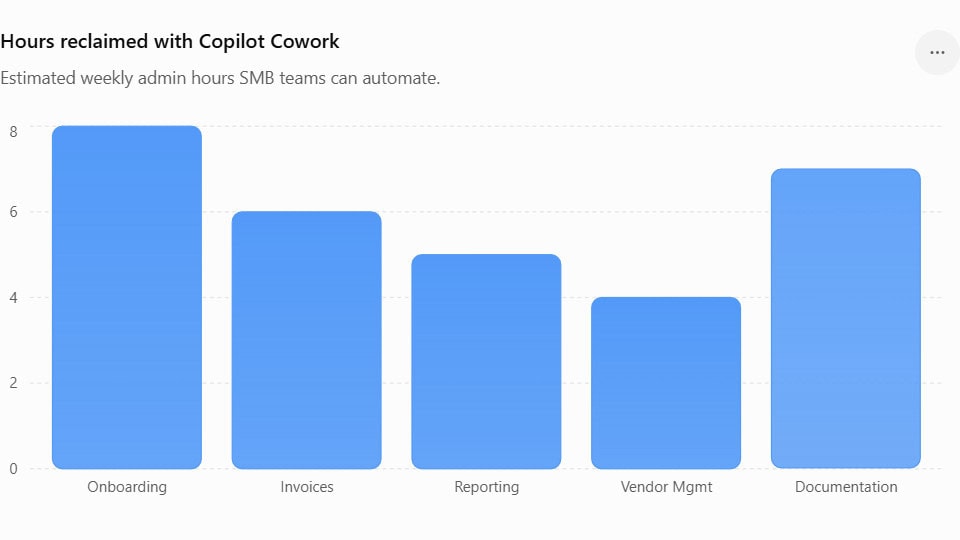
For small and mid-sized businesses, Copilot Cowork could be a massive force multiplier.
SMBs are often running lean. Teams wear multiple hats. Resources are stretched.
Copilot Cowork can help automate:
That means fewer repetitive tasks, faster turnaround times, and more time spent on growth.
The opportunity for SMBs isn’t just productivity.
It’s capacity.
Copilot Cowork gives smaller businesses the ability to scale without immediately adding headcount.
The key is knowing where to start.
The best first use cases are repetitive, manual, and time-consuming.
That’s where ROI shows up fastest.
How Enterprise businesses can scale with Copilot Cowork
Enterprise businesses will likely see even bigger gains, but with greater complexity.
Copilot Cowork opens the door to automating knowledge work at scale.
Think about the impact across:
This is all about operational redesign.
Enterprise businesses now can rethink how work flows across teams.
But scale creates new challenges.
Who owns AI automation?
Who approves workflows?
How is risk managed?
These become critical questions.
Copilot Cowork governance, security, and compliance considerations
For enterprise adoption, governance matters as much as capability.
The more AI does, the more important your controls become.
Businesses need to think about:
The good news is Copilot Cowork operates within the Microsoft 365 trust boundary.
That means it inherits your existing Microsoft security, compliance, and identity controls.
For businesses already invested in Microsoft 365, this lowers risk significantly compared to disconnected AI tools.
But inherited security doesn’t replace intentional governance.
Businesses still need policies, training, and clear guardrails.
How to get started with Copilot Cowork using Mobile Mentor’s Copilot Mentoring
Copilot Cowork is powerful.
But like every emerging technology, success depends on how you adopt it.
Turning it on is easy. Getting value from it takes strategy. That’s where Mobile Mentor can help.
Our Copilot Mentoring program helps businesses get practical with AI…fast.
We help you:
Because AI success isn’t about experimenting forever.
It’s about building repeatable, measurable business value.
Copilot Cowork is now here. The question is: what work will you hand off first?
LEARN MORE ABOUT COPILOT MENTORING SERVICES
Contact a Mobile Mentor expert today