Casual employees working in an office

SCCM (now Microsoft Configuration Manager) has earned its place in enterprise IT. It’s powerful, predictable, and deeply capable—especially in traditional onprem environments.

But endpoint security has changed.

Endpoints aren’t just managed assets anymore, they’re live risk surfaces connected to cloud apps, remote users, mobile networks, and adversaries that move at machine speed. Modern endpoint defense isn’t just “patch, deploy, report.” It’s:
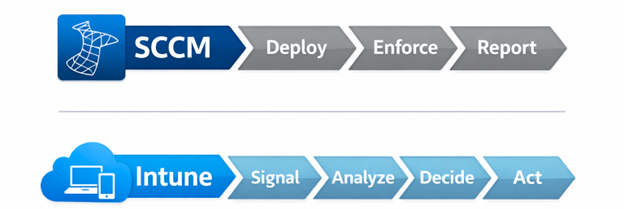
  • Detect risk in real time

  • Correlate signals across identity + endpoint + threat

  • Remediate fast—before users notice and before attackers spread

That’s where Microsoft Intune is pulling away. Not because it’s cloud-based, but because it’s increasingly AI-enhanced and connected to Microsoft’s broader security intelligence.

At Mobile Mentor, we explain it like this:

SCCM enforces endpoint configuration.
Intune uses AI + cloud signals to defend endpoints.

SCCM Manages Configuration. Intune Uses AI to Evaluate Trust.

SCCM is excellent at what it was designed for: deploying software, enforcing configurations, and managing Windows devices inside a controlled environment.

Intune’s security advantage is that it operates in a Zero Trust ecosystem, where device trust is continuously evaluated and tied to access decisions. When used with Conditional Access, Intune evaluates whether a device is managed and compliant (encryption, jailbreak/root status, required settings), and it can also incorporate post-breach incident signals coming from Microsoft Defender for Endpoint’s ongoing behavioral analysis.

That “post-breach” piece is the game-changer. Traditional management platforms can confirm whether a setting is configured. They can’t easily answer:  Is this endpoint currently under attack?

Intune can, because it’s designed to ingest and act on security signals, not just configuration state.

AI That Improves Decisions: Copilot in Intune

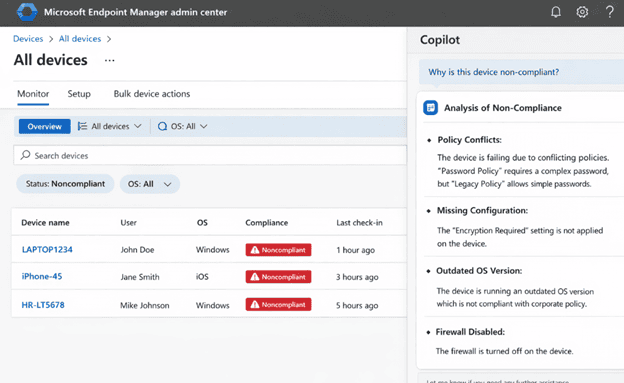
One of the most visible examples of “AI in Intune” is Microsoft Security Copilot integration which is embedded directly in the Intune admin experience and also available via the Security Copilot portal.

Copilot can help teams:

  • Explore Intune data using natural language

  • Summarize device and policy posture

  • Compare a “working” vs “non-working” device

  • Accelerate troubleshooting and decision-making for endpoint risk and compliance

This matters because endpoint security failures often aren’t caused by a missing tool. They’re caused by:

  • A missed configuration

  • A policy conflict

  • A scope mistake

  • A delayed response because analysis took too long

AI reduces that operational drag by making the platform easier to interrogate and faster to act in, especially in incidents where minutes matter.

And importantly: this isn’t “random chatbot AI.” It’s AI grounded in your tenant data (devices, policies, assignments, compliance states) to accelerate real admin workflows.

AI Agents: Risk-Aware Guardrails for High-Impact Changes

Intune is also introducing Copilot-powered agents inside the admin center that help reduce human error in sensitive workflows.

One example: the Change Review Agent (designed to support Multi-Admin Approval flows). Instead of an approver manually guessing whether a requested script or change looks risky, the agent can pull together context and signals to provide a recommendation with reasoning—while still keeping the final decision with a human.

This is subtle but important. Endpoint management is full of “high-impact, low-visibility” actions:

  • scripts

  • privilege changes

  • configuration pushes

  • security setting updates

SCCM can execute these actions. But it doesn’t natively provide AI-driven context and cross-signal correlation to help prevent the wrong change from being approved and deployed at scale.

That’s where Intune is heading: AI to reduce the risk of admin mistakes becoming security incidents.

AI-Driven Analytics: From Reactive Tickets to Proactive Security Hygiene

Most endpoint teams are drowning in tickets:

  • slow boot times

  • app crashes

  • broken VPN/Wi-Fi profiles

  • OneDrive sync loops

  • device health regressions after updates

Intune’s Endpoint analytics and Advanced Endpoint Analytics shift the posture from reactive to proactive by providing data-driven insights into device performance, app reliability, and readiness for secure work-from-anywhere scenarios, directly in the Intune admin center.

Where AI shows up: anomaly detection and correlation.

Advanced Endpoint Analytics adds capabilities that use machine learning to detect anomalies and correlate likely root causes (for example, after a configuration change triggers regressions or new crash patterns).

This is more than “DEX.” It’s security too.

Why?

  • Unhealthy devices are the easiest to compromise

  • Devices lagging on updates become exploit targets

  • Reliability issues push users toward insecure workarounds

AI-driven anomaly detection helps teams spot emerging problems early—before they become widespread and before they degrade security posture at scale.

Automated Remediation: Fixing Problems Before They Become Incidents

Intune’s Endpoint Analytics includes the ability to apply remediations based on insights, supporting proactive troubleshooting loops in the admin workflow.
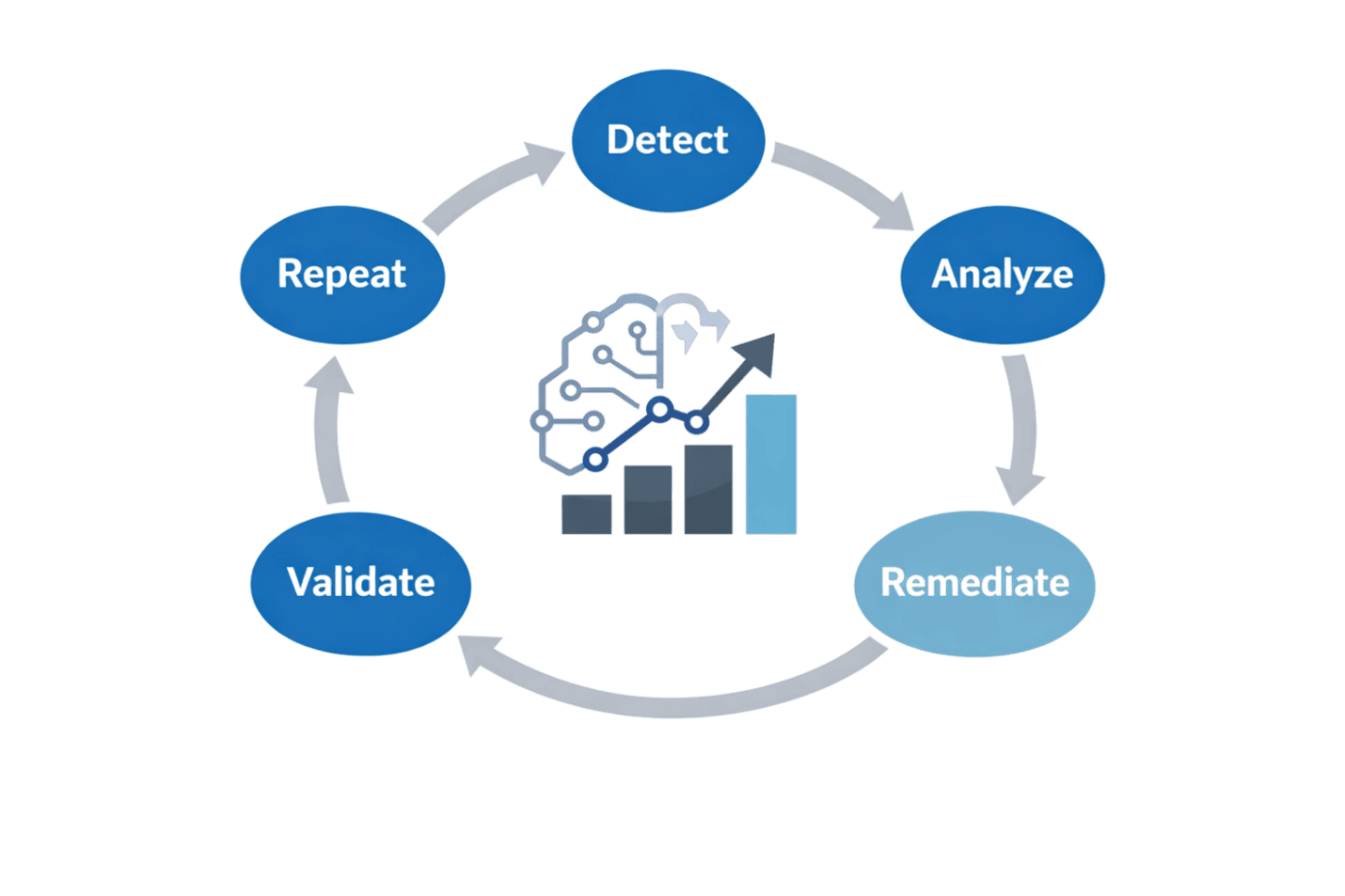
In practice, teams commonly use Proactive Remediations (a scheduled detect-and-fix model) to automatically identify drift and enforce desired state on endpoints—reducing manual intervention and shrinking the window where misconfigurations become vulnerabilities.

SCCM can remediate too, but it tends to rely on:

  • schedules

  • collections

  • compliance baselines

  • scripting and operational overhead

Intune’s model is increasingly oriented toward continuous signal → insight → remediation, supported by analytics and AI-driven triage.

The Real Difference: Security Is Now Signal-Connected

When customers ask us “Intune vs SCCM for security,” the answer is rarely “pick one and delete the other.” Many environments use co-management during transition.

But the direction is clear:

  • SCCM is a powerful on-prem management engine.

  • Intune is a cloud-connected security control point designed to ingest signals and enforce trust.

Conditional Access is a good example of that: Intune can validate compliance and also incorporate active incident signals from Defender for Endpoint for real-time evaluation.

That’s a fundamentally different security model than “deploy a config and hope it stays true.”

Conclusion

This shift goes beyond cloud and on-premises.

It’s really about this:

Old Model (SCCM) New Model (Intune) 
Configuration-first Risk + signal-first 
Periodic assessment Continuous evaluation 
Manual investigation AI-assisted investigation 
Admin-driven decisions AI-supported guardrails 
Reactive support Proactive anomaly detection + remediation 

SCCM enforces endpoint configuration.
Intune uses AI and security signals to defend endpoints.

At Mobile Mentor, we help businesses move to modern management without breaking what works (often through co-management and phased workload migration) while adopting the AI-enhanced security capabilities that make Intune the stronger long-term control plane.

Download the Six Pillars of Modern Endpoint Management

Learn about features and strategies such as:

  • Zero Trust

  • Passwordless Authentication

  • Zero-Touch Provisioning

  • App Management

  • Over-the-air updates

  • Remote support

Denis O'Shea