
Every business depends on devices. Whether it be laptops, tablets, or phones, all are used to empower people to do their best work. But behind the scenes, strong device lifecycle management is what keeps those devices secure, consistent, and productive from the day they arrive to the day they’re retired.
When it comes to mobile device lifecycle management, one thing is always true: when the lifecycle is well managed, support, security, compliance, and the employee experience all get easier.
Why Device Lifecycle Management Deserves More Attention
Most companies now operate in a hybrid, device-diverse world. Team members work across home networks, corporate offices, and travel environments and often switch between multiple devices in a single day. Without a mature device lifecycle strategy, complexity creeps in quickly:
A strong lifecycle framework prevents that drift. And when businesses use modern tools (whether it’s Microsoft Intune, Apple Business Manager, or Android Enterprise) the entire process becomes more automated and reliable.
Understanding the Asset Management Lifecycle Phases
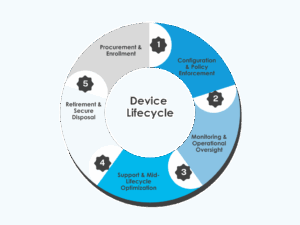
Great mobile device lifecycle management follows a clear pattern. The phases themselves have been around for years, but the technology behind them has evolved dramatically.
-
Procurement & Enrollment
 This is where employees get their first impression of IT. Automated provisioning (such as Windows Autopilot) enables devices to ship directly to users and configure themselves the moment they sign in.
-
Configuration & Policy Enforcement
Once enrolled, devices receive the settings and policies that keep them compliant.
Whether you’re using Intune, JAMF, or another platform, the goal is the same: consistent apps, security baselines, and configurations across every device. Microsoft’s tooling often plays a central role here because of how cleanly it integrates identity, compliance, and security.
-
Monitoring & Operational Oversight
This is where insights matter. Modern platforms offer analytics, vulnerability reporting, patch visibility, and real-time compliance data.
Microsoft Intune, in particular, ties device health back to identity and access, making it easier to act when something drifts out of compliance.
-
Support & Mid-Lifecycle Optimization
Devices age. Apps misbehave. Batteries weaken. People get creative.
This phase is all about realignment. Automation and self-service tools reduce friction for users, while endpoint management platforms help IT detect issues before they become outages.
-
Retirement & Secure Disposal
This final step is often underestimated, yet it’s one of the most important.
Whether you’re using Intune’s remote wipe, Apple’s erase commands, or vendor-managed recycling, the goal is clear: secure data removal and responsible disposition.
Well-managed retirement closes the loop and starts the next cycle with fewer surprises.
Technology Matters, But the Strategy Matters More
Modern tools make each lifecycle phase smoother and more secure, and platforms like Microsoft Intune often become the backbone for businesses streamlining their device ecosystem. But tools alone aren’t the strategy.
The real value comes from a coherent approach to asset management lifecycle phases, supported by automation, consistent governance, and a focus on the employee experience.
When lifecycle management is strong:
Conclusion
The most successful businesses are managing the entire journey of those devices with intention. And when technology changes quickly and expectations rise even faster, that intentionality is what sets modern IT leaders apart.