
Microsoft Copilot security is becoming a top priority for businesses adopting generative AI. Microsoft 365 Copilot can help employees find information, summarize documents and meetings, analyze data, create content, and automate work across Microsoft 365. But those capabilities also make data security, identity security, permissions, compliance, and AI governance more important than ever.
The most important thing to understand about Microsoft Copilot security is this:
Microsoft Copilot does not simply create a new security problem. It can expose and amplify existing problems with how an organization manages data, permissions, identities, devices, and applications.
If employees already have inappropriate access to sensitive information, Copilot can make that information significantly easier to discover.
That makes Copilot readiness a security and governance issue, not simply an AI deployment project.
For businesses evaluating their readiness, Mobile Mentor’s Microsoft Copilot services provide a broader framework for assessing technical readiness, developing use cases, and building a secure path to adoption.
What are the biggest Microsoft Copilot security risks?
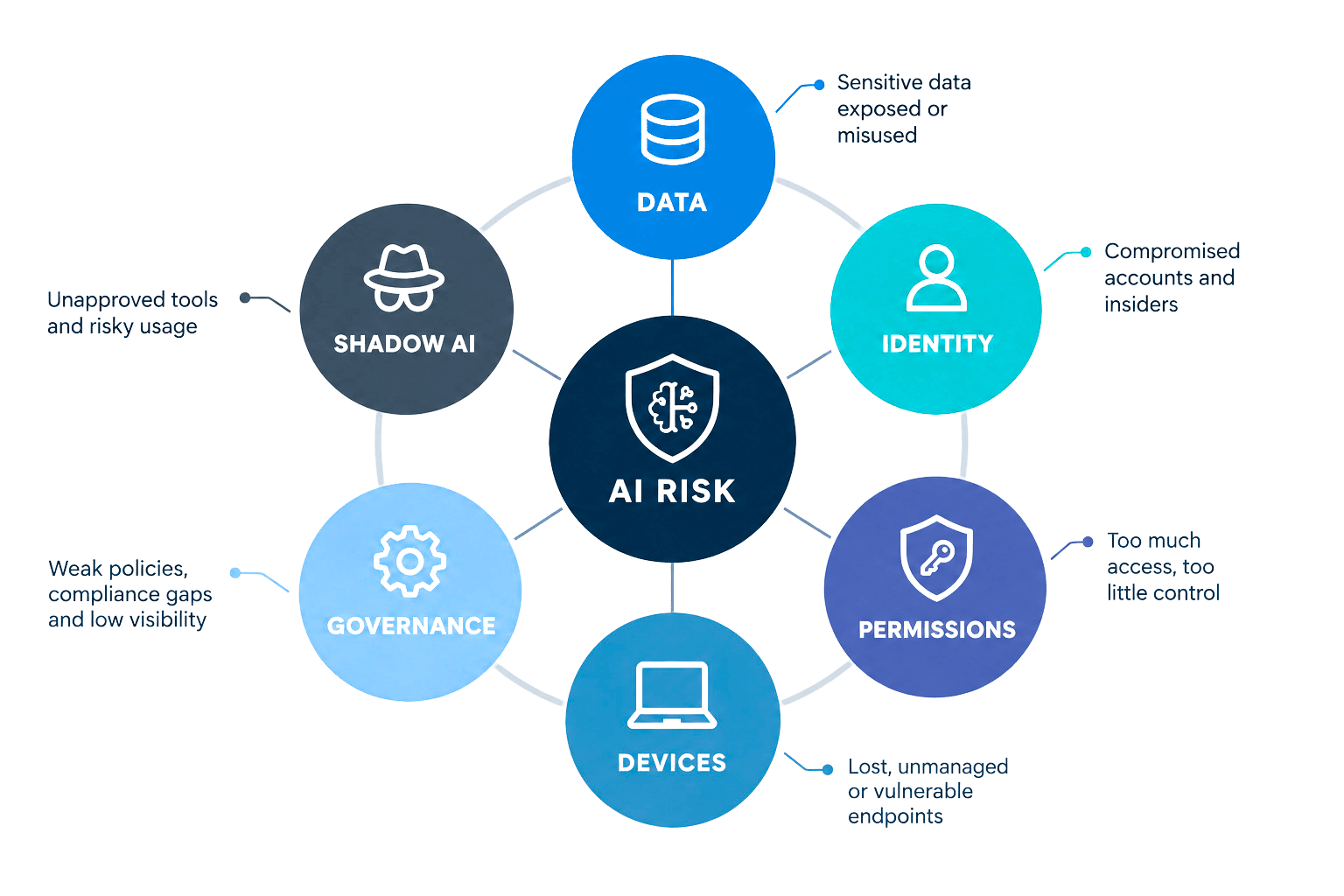
The most significant Microsoft Copilot security risks for enterprises include:
- 1Data oversharing and excessive permissions
- 2Sensitive data being accessible to more employees than necessary
- 3Weak identity and access controls
- 4Unmanaged or noncompliant devices
- 5Inadequate data classification and governance
- 6Shadow AI and unsanctioned AI applications
- 7Insufficient monitoring and auditing
- 8AI-generated content being inaccurate or used without appropriate human review
- 9Third-party applications and connectors introducing additional data-access pathways
- 10Poorly governed AI agents gaining access to business data
Of these, data oversharing is one of the most important risks organizations should address before deploying Microsoft 365 Copilot at scale.
The Copilot Readiness Assessment covers many of these same considerations, including SharePoint permissions, Teams membership, external sharing, sensitivity labels, and Microsoft Purview protections.
Is Microsoft Copilot secure for enterprise use?
Yes, Microsoft 365 Copilot is designed for enterprise use and operates within Microsoft’s security, privacy, and compliance framework. However, the security of a Copilot deployment depends heavily on the security and governance of the Microsoft 365 environment surrounding it.
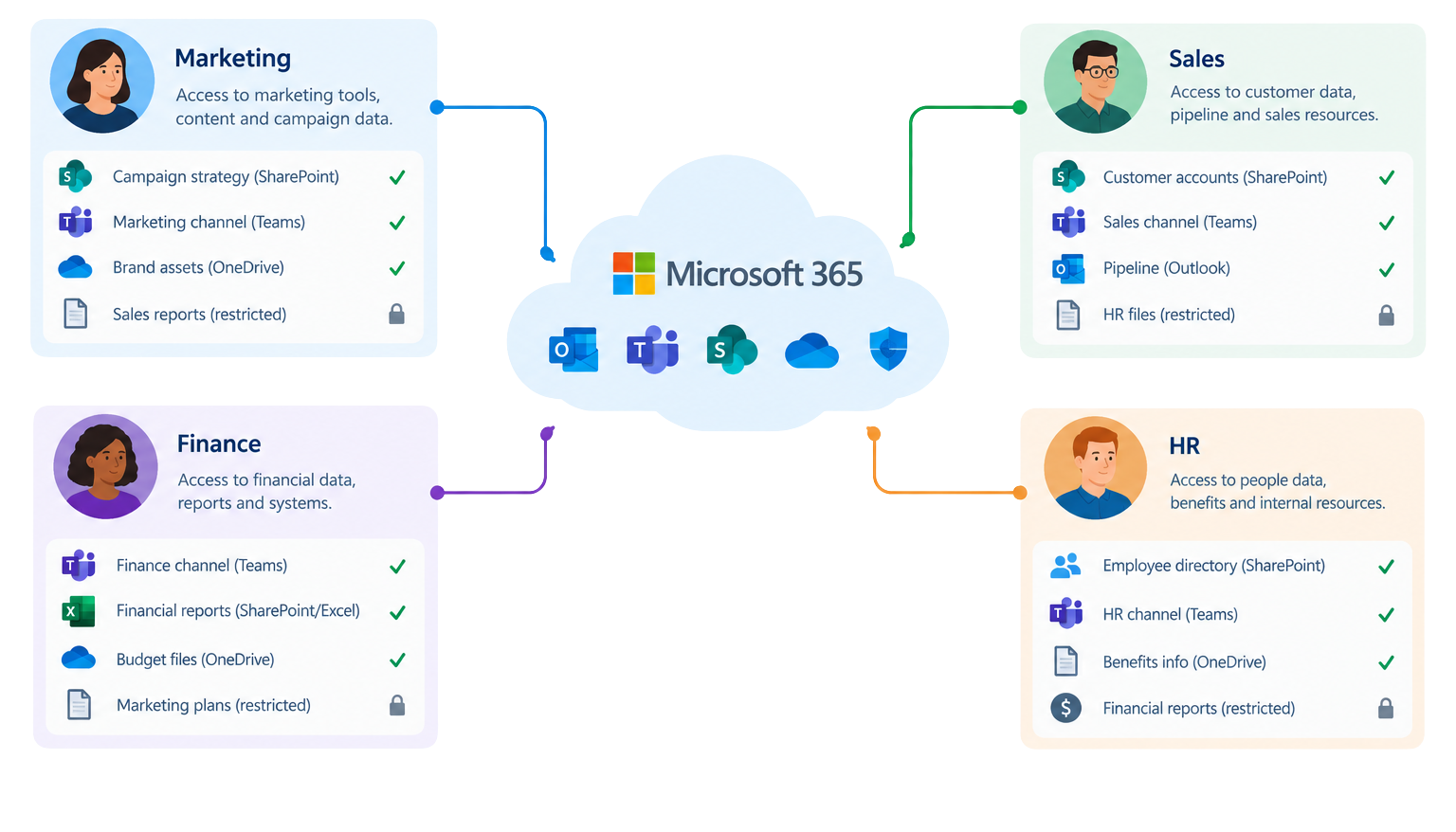
Microsoft 365 Copilot uses organizational data that the user is authorized to access. It does not simply bypass existing permissions and give employees access to everything in the tenant.
That distinction is critical.
If an employee already has access to a SharePoint site, document, email, Teams conversation, or other piece of information, Copilot may make it much easier for that employee to find, summarize, or use that information.
In other words:
Copilot generally respects existing access permissions. The problem is that organizations may not realize how broad those permissions have become.
Microsoft recommends organizations assess and remediate oversharing as part of establishing a secure and governed Copilot foundation.
Mobile Mentor has also written about preparing for the secure adoption of Microsoft 365 Copilot, including the role of Zero Trust architecture in controlling access to organizational data.
What is Microsoft Copilot oversharing?
Copilot oversharing occurs when users can access more organizational information than they need for their jobs, and Copilot makes that information easier to discover.
Consider a simple example.
A company has a SharePoint site that contains:
At some point, the site was accidentally configured so that everyone in the organization could access it.
Before Copilot, that problem might remain hidden.
Most employees would never know the documents existed. They would have to navigate to the site, understand its structure, locate the files, and open them.
With Copilot, an employee could potentially ask a natural-language question that causes relevant information to surface.
The underlying permission problem has not necessarily changed.
The visibility of the problem has.
This is why Copilot readiness should begin with a review of existing permissions and data access.
Businesses that want to go deeper can also evaluate their broader Microsoft 365 environment through the Capability & Capacity Assessment, which examines areas including identity, endpoints, data, access policies, and Copilot readiness.
Does Microsoft Copilot have access to all company data?
No. Microsoft 365 Copilot does not give every user access to all company data. Copilot’s responses are grounded in information the user is authorized to access.
However, organizations often have complex Microsoft 365 environments containing years of accumulated permissions.
Users may have access through:
As environments grow, permissions can become difficult to understand and maintain.
That is where the real Copilot security challenge begins.
The question is not simply whether Copilot is secure. The question is whether your Microsoft 365 data is appropriately secured before Copilot starts making that data easier to find.
How do you secure Microsoft Copilot?
A secure Microsoft Copilot deployment requires more than enabling a license.
Organizations should address five core areas:
-
Identity
Make sure the right people have access to the right resources.
Review:
Mobile Mentor’s Identity Services include capabilities around Entra ID governance and guest access, helping organizations establish stronger identity controls as part of a broader Microsoft security strategy.
-
Data
Understand what information exists and how sensitive it is.
Organizations should identify:
Then determine who should have access to each category.
-
Permissions
Review whether users have more access than they actually need.
Pay particular attention to:
-
Devices
Copilot can make employees more productive from almost anywhere, which makes endpoint security increasingly important.
Organizations should understand whether users accessing corporate information are working from:
Microsoft Intune and Microsoft Defender can play important roles in managing and protecting those endpoints. Mobile Mentor’s Intune services focus specifically on modern endpoint management and protecting company data across devices.
-
Governance
Finally, organizations need clear rules for how AI can be used.
Employees should understand:
How does Microsoft Purview help secure Copilot?
Microsoft Purview provides organizations with important tools for protecting, governing, and monitoring data used with Microsoft Copilot.
Purview can help organizations address areas such as:
One of the most important concepts is data classification.
An organization cannot effectively protect sensitive information if it does not know where that information is or how sensitive it is.
For example, a company might classify information as:
Those classifications can then be used to establish more appropriate controls around how information is accessed, shared, stored, and used with AI.
Mobile Mentor’s Microsoft Purview Data Security for AI specifically addresses AI usage, shadow AI, sensitive-data protection, and governance across Copilot and other generative AI tools.
For organizations with sensitive information outside Microsoft 365, the Microsoft Purview Information Protection Scanner can also help discover, classify, label, and protect data in on-premises repositories
What role does Microsoft Entra play in Copilot security?
Microsoft Entra ID is a foundational component of Microsoft Copilot security because Copilot operates within the user’s identity and access context.
Organizations should review:
The principle should be simple:
A user should only be able to access the information and applications necessary for their role, and that access should be continuously evaluated.
Strong identity controls help establish that foundation.
How does SharePoint security affect Microsoft Copilot?
SharePoint security directly affects Copilot because SharePoint is one of the primary locations where organizations store and collaborate on business information.
Organizations preparing for Copilot should identify SharePoint sites that are:
This is one reason SharePoint governance should be part of a broader Copilot readiness strategy, rather than treated as a separate IT housekeeping exercise.
Microsoft provides SharePoint management capabilities alongside Purview controls that can help organizations identify and remediate these risks.
A Copilot deployment can therefore become a catalyst for cleaning up a data environment that already needed attention.
The biggest Microsoft Copilot security mistake
The biggest mistake organizations can make is treating Copilot security as a problem that begins when Copilot is turned on.
It doesn’t.
Copilot security begins with the underlying Microsoft 365 environment.
If identity is poorly governed, Copilot does not fix that.
If SharePoint permissions are excessive, Copilot does not fix that.
If sensitive information is not classified, Copilot does not fix that.
If employees are using unapproved AI tools, Copilot does not fix that.
And if nobody knows where sensitive organizational information lives, deploying another powerful way to find it does not solve the underlying problem.
Copilot amplifies the value of a well-governed Microsoft 365 environment, but it can also amplify the consequences of a poorly governed one.
Mobile Mentor has seen this firsthand. In a recent discussion about Copilot readiness, the company shared how an internal assessment uncovered 33,000 at-risk assets, illustrating how AI adoption can expose underlying data-governance issues that existed long before Copilot.
Build a secure foundation for Microsoft Copilot
Microsoft Copilot has the potential to change how employees interact with organizational information.
The organizations that benefit most will not necessarily be the ones that deploy it fastest.
They will be the organizations that understand their data, secure their identities, manage their endpoints, govern access, and establish clear rules for responsible AI use.
That is why Microsoft Copilot readiness should be treated as a security and governance initiative as much as an AI initiative.
Before asking what Copilot can do for your organization, ask a more fundamental question:
Is your Microsoft 365 environment ready for AI?
We can help answer that question. A Copilot Readiness Assessment can help identify data oversharing, identity gaps, endpoint risks, governance issues, and other areas that should be addressed before AI adoption scales.
Get in Touch With the Mobile Mentor Team to Learn More

Andrew Reade
Andrew is our Digital Marketing Manager and oversees web-based marketing strategies and content creation for the organization. As a marketing veteran, Andrew has worked with organizations of all sizes in a diverse group of industries, from Risk Management to Transportation. Joining the organization in 2021, Andrew is based in Mobile Mentor’s Nashville, TN office.