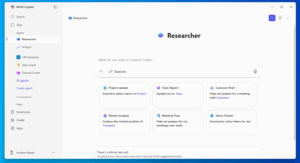
Imagine having an assistant who never gets tired, never misses a detail, and can scan thousands of pages in under a minute. That’s what it feels like to use the Microsoft Copilot Researcher Agent.
Whether you’re working in Microsoft 365 or inside Copilot Studio, this agent can explore, analyze, and provide a summary of information faster than most people can type their first query.
What is the Copilot Researcher Agent?
The Copilot Researcher Agent is part of Microsoft’s next generation of Copilot AI for research and analysis. It’s designed to handle deep, multi-layered research and pull together insights from internal data, documents, and trusted online sources.
It can:
And honestly, it’s just cool to watch the Copilot Researcher Agent work. You can see it think, refining its search in real time as it evaluates sources, compiles notes, and filters the noise. It feels less like a bot and more like a tireless digital analyst that’s always one step ahead.
How Fast Does It Work?
The Copilot Researcher Agent typically completes an initial research cycle in about 60 to 90 seconds, depending on how complex the question is and how much content it needs to parse.
Follow-up requests like “find supporting data for that claim” or “expand this with recent case studies” usually come back in under 30 seconds.
It’s fast enough to keep your momentum going without breaking your workflow.
Accessing Copilot Researcher
You can access Copilot Researcher directly through:
Once it’s activated, you just describe your goal: “Find recent research on AI adoption in higher education,” for example, and the agent begins its analysis instantly.
Researcher vs. Analyst: What’s the Difference?
Think of it like this:
Both agents enhance productivity but serve distinct purposes:
| Agent | Primary Role | Example Use Case |
|---|---|---|
| Researcher | Gathers, synthesizes, and summarizes information from diverse sources. | “Summarize industry trends and highlight competitive risks.” |
| Analyst | Processes, visualizes, and interprets data for decision-making. | “Analyze sales data and identify top-performing regions.” |
Together, they form a powerhouse combination and your own personal AI research and analytics team inside Microsoft 365.
Best Practices for Using Copilot Research
To get the most out of Copilot Researcher and Analyst, keep these tips in mind:
For more prompting tips, you can check out our guide 😊 Copilot Prompt Guide
Real-World Example
Scenario: A team preparing a board presentation on hybrid work trends wants to blend internal engagement data with market insights.
Prompt:
“Using our employee survey results and external research from Gartner and Microsoft, summarize the top three hybrid work challenges and propose data-backed solutions for 2026.”
Result: Copilot Researcher gathers internal and external data, synthesizes key findings, and generates a structured summary with citations and ready for review or further analysis in PowerPoint.
Why It Matters
The Microsoft Copilot Researcher Agent shows how AI can make research more intelligent, not just faster. It connects ideas, identifies trends, and provides the context behind the data .
In short: Copilot does the digging, you do the thinking.
If you want to get hands-on with this capability and truly understand how to make Copilot work for your business, check out our Copilot Mentoring. Our experts will guide you step-by-step to unlock the full potential of tools like the Copilot Researcher and Analyst Agents, helping your team save time and make smarter, data-driven decisions.