
Microsoft Intune has become the foundation of modern endpoint management, helping businesse secure and manage Windows, macOS, iOS, Android, and cloud-connected devices from a single platform. As Microsoft’s security and management ecosystem continues to evolve, understanding Intune licensing has become more important than ever.
Whether you’re planning an Intune deployment, evaluating Intune Suite, or comparing Intune Plan 1 vs Plan 2, this guide explains the current licensing landscape, what’s included, and how to choose the right option for your business.
New for July 2026:
The Microsoft Intune Suite’s most valuable capabilities are now included with Microsoft 365 E3 and E5 licenses, reducing the need for separate Intune Suite add-ons for many businesses. Learn more here: On-Demand Webinar: Intune Suite Is Coming to E3 & E5: Are You Ready for Day One Impact?
Microsoft Intune Licensing Explained
One of the most common questions businesses ask is:
“What Microsoft Intune licensing do I actually need?”
The answer depends on your security requirements, device types, and Microsoft licensing.
In 2026, businesses generally have four primary licensing paths:
| License | Best For |
|---|---|
| Microsoft Intune Plan 1 | Core endpoint management |
| Microsoft Intune Plan 2 | Advanced endpoint management capabilities |
| Intune Suite | Premium management, security, and automation |
| Microsoft 365 E3/E5 | Organizations wanting Intune bundled with productivity and security services |
Many businesses already own Intune without realizing it because it’s included with several Microsoft 365 and Enterprise Mobility + Security (EMS) subscriptions.
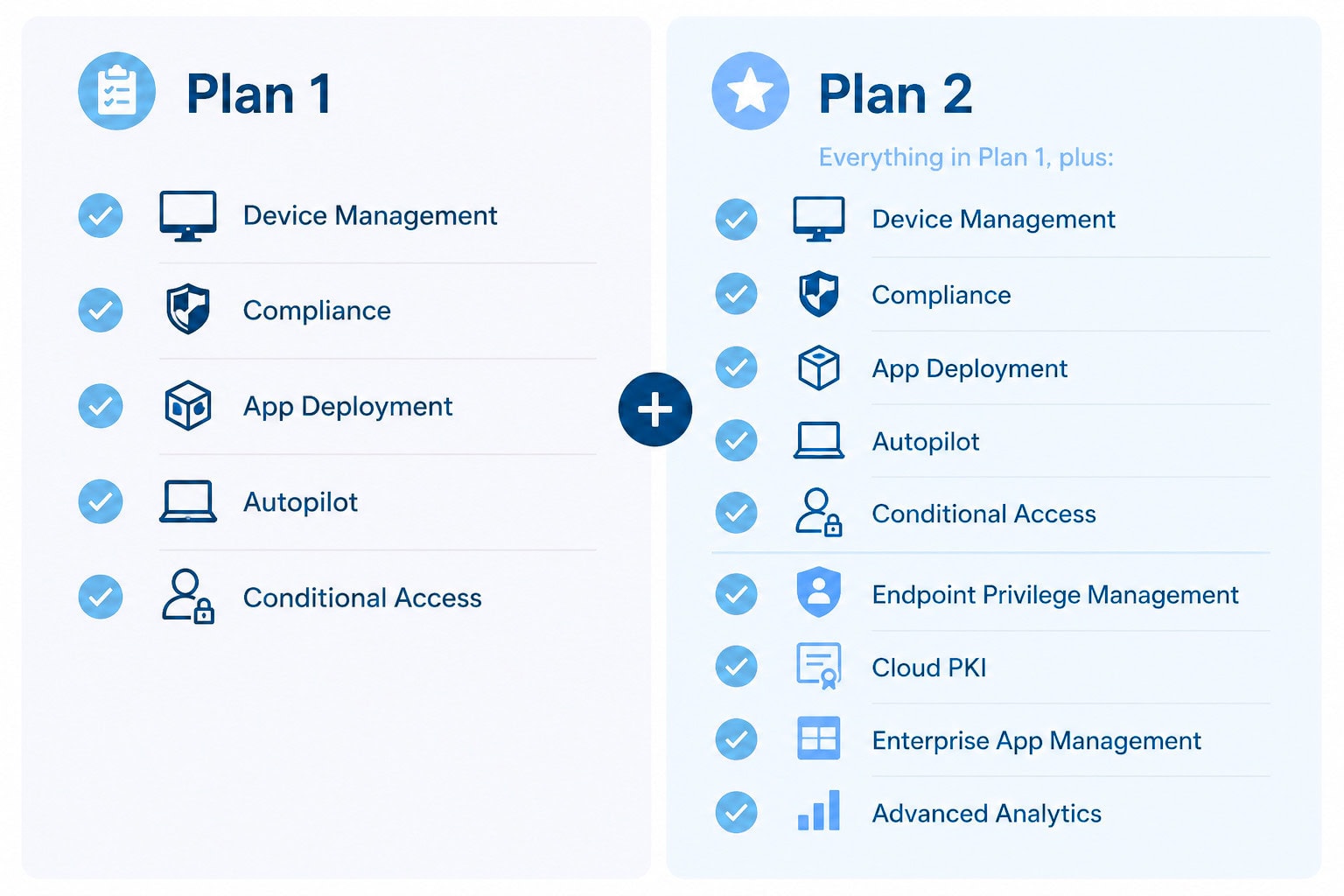
Intune Plan 1 vs Plan 2
Understanding Intune Plan 1 vs Plan 2 is one of the biggest licensing decisions organizations face.
Intune Plan 1
Intune Plan 1 includes the core capabilities most businesses need, including:
For many businesses, Plan 1 provides everything needed to successfully manage modern endpoints.
Intune Plan 2
Plan 2 builds on Plan 1 by adding more advanced capabilities designed for larger or more security-focused businesses.
Depending on your Microsoft licensing, Plan 2 features may include:
These features reduce administrative overhead while improving security and user experience.
What Is Intune Suite?
Intune Suite is Microsoft’s premium endpoint management offering.
Rather than replacing Plan 1, Intune Suite layers advanced management capabilities on top of the core Intune platform.
Key capabilities include:
For businesses embracing Zero Trust or managing thousands of endpoints, Intune Suite provides tools that significantly reduce manual administration while improving security.
Changes to Intune Licensing in 2026
Microsoft has continued simplifying Microsoft Intune licensing throughout 2026.
Beginning July 1, 2026, several core Intune Suite capabilities became available within qualifying Microsoft 365 Enterprise licenses:
Microsoft 365 E3 includes:
Microsoft 365 E5 adds:
These changes reduce the need for separate add-on licensing for many organizations and increase the value of Microsoft 365 Enterprise subscriptions.
Businesses should review their current licensing before purchasing additional Intune Suite licenses, as they may already own capabilities previously sold separately.
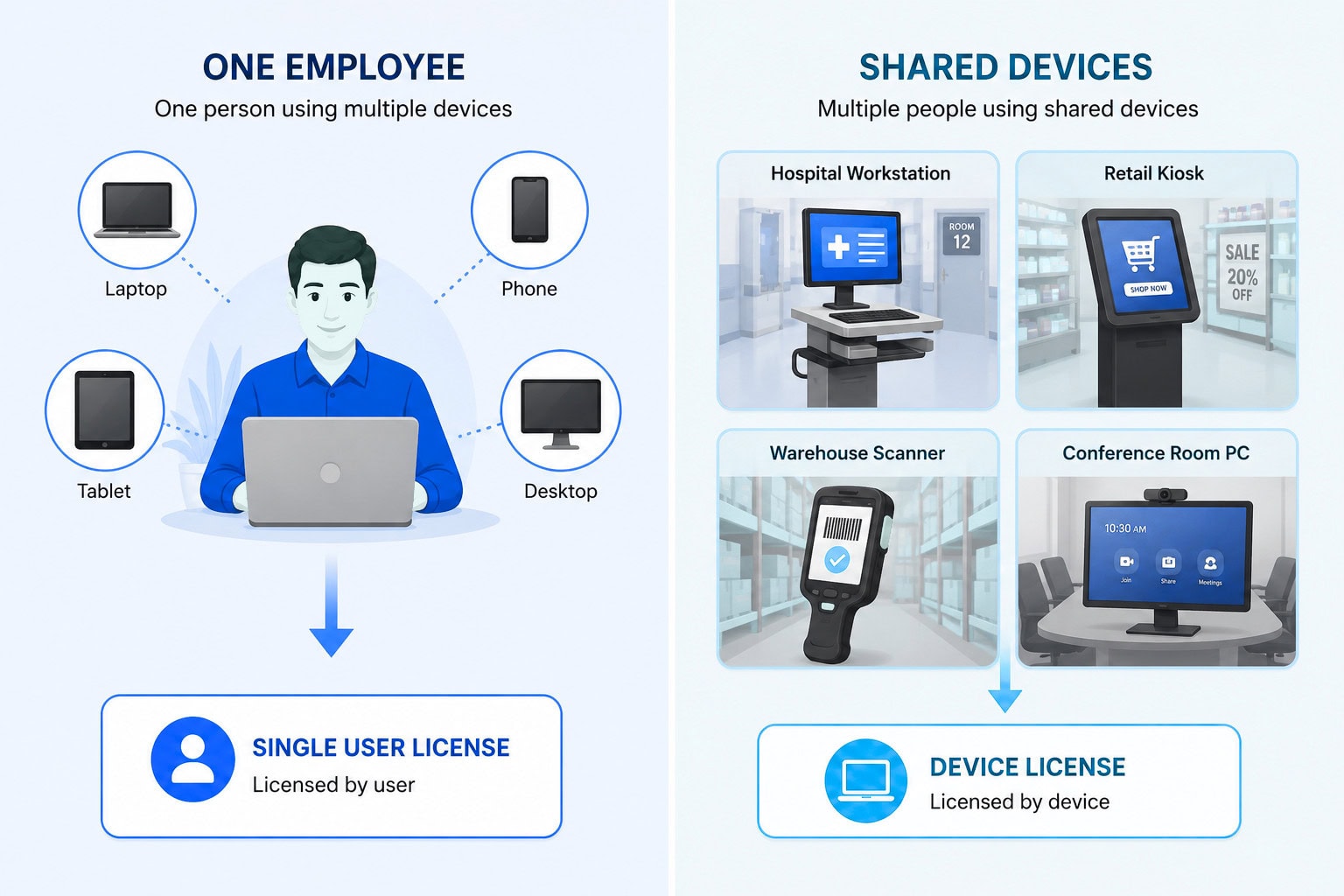
Intune Device License vs User License
Another common question concerns the Intune device license.
Microsoft generally offers two licensing models:
User Licensing
A user license allows one licensed employee to manage multiple enrolled devices, making it the preferred option for most businesses.
This is ideal for:
Device Licensing
An Intune device license is designed for shared devices rather than individual users.
Typical scenarios include:
Businesses managing shared devices often find device licensing more cost-effective than assigning individual user licenses.
How Much Does an Intune License Cost?
One of the most searched questions is Intune license cost.
The exact Intune licensing cost depends on:
Because Microsoft periodically updates pricing and bundles services into Microsoft 365 plans, businesses should review Microsoft’s current licensing pages or work with a Microsoft partner to determine the most cost-effective option.
In many cases, businesses discover they already own Intune through Microsoft 365 Business Premium, Microsoft 365 E3, Microsoft 365 E5, or EMS subscriptions.
Planning a Successful Intune Deployment
Licensing is only one part of a successful Intune deployment.
Businesses should also consider:
Identity
Device Enrollment
Application Management
Security
A structured deployment approach helps reduce disruption while improving adoption and security outcomes.
Best Practices for Intune Management
Effective Intune management extends beyond enrolling devices.
Organizations should continuously:
Modern endpoint management is an ongoing operational process rather than a one-time implementation.
Frequently Asked Questions
Learn More
For the latest licensing details, Microsoft’s official resources are the best place to start:
- Microsoft Intune licensing documentation: https://learn.microsoft.com/mem/intune/fundamentals/licenses
- Microsoft Intune pricing: https://www.microsoft.com/microsoft-intune
- Microsoft Intune Suite overview: https://learn.microsoft.com/mem/intune/fundamentals/intune-suite
Conclusion
Microsoft has made Intune licensing significantly easier to understand in 2026 by expanding the capabilities included in Microsoft 365 Enterprise plans. Even so, businesses should evaluate their current subscriptions before purchasing additional licenses, as many advanced endpoint management features may already be included.
Whether you’re comparing Intune Plan 1 vs Plan 2, evaluating Intune Suite, estimating Intune license cost, or planning a new Intune deployment, understanding the available licensing options is key to maximizing your Microsoft investment while building a secure, modern workplace.


Andrew Reade
Andrew is our Digital Marketing Manager and oversees web-based marketing strategies and content creation for the organization. As a marketing veteran, Andrew has worked with organizations of all sizes in a diverse group of industries, from Risk Management to Transportation. Joining the organization in 2021, Andrew is based in Mobile Mentor’s Nashville, TN office.